
Your WhatsApp Lives on a Phone. Your Business Shouldn't.

Picture the most valuable conversations in your business right now.
The customer who's about to book. The one who's unhappy and hasn't said so yet. The referral who messaged on Sunday night asking if you're taking on new work.
Where are they?
For a lot of business owners, the honest answer is: on a phone. One phone. Possibly with a cracked screen. Possibly in the pocket of someone who's on holiday in Spain this week.
That's why I care so much about getting a proper WhatsApp HighLevel integration in place. Not because it's clever technology. Because a business that lives on one phone is one dropped phone, one resignation or one long weekend away from forgetting its own customers.
WhatsApp is personal. Your customer records shouldn't be.
A business that lives on one phone
WhatsApp is where people actually talk. Meta says more than 3 billion people use WhatsApp. It's where families plan birthdays, where friends argue about football, and where your customers would quite like to ask you a quick question without filling in a form.
And businesses have noticed. Back in 2023, Meta said 1 billion people message a business each week across its apps.
So the conversations are happening. That isn't the problem.
The problem is where they end up.
How it usually starts
Nobody sits down and decides to run their business from a phone. It just happens.
You put your mobile number on the website because it was easier. A customer messages you on WhatsApp. You reply, because of course you do. Then another. Then a supplier. Then a team member sets up WhatsApp on the shop phone, and somebody else uses their own phone "just for now".
Two years later, a meaningful chunk of your revenue is flowing through chats that only one or two people can see.
There's no single moment where it went wrong. It's more like a garage. Nobody plans to fill it with junk. It just fills up, one box at a time.
What it looks like from the inside
Imagine a dental practice where the practice manager handles WhatsApp from her own phone. She's brilliant. Patients love her. She remembers who's nervous, who wants early appointments, and whose child needs a check-up in the spring.
Now imagine she's off sick for two weeks.
Who answers the patient who messaged about a cracked filling? Who knows that the person asking about whitening already had a consultation in March? Who even knows those messages exist?
Nobody. Because the business didn't know any of it. She did.
That's not her fault. It's a system problem dressed up as a people problem.
Why WhatsApp chats on a phone cost you more than you think
When I ran my agency, most of our clients were private medical practices, mostly in the US. Many of them were stuck on one channel, usually Facebook Ads. Results were getting worse, no-shows and cancellations were climbing, and agency after agency had tried to fix the same channel.
We usually ended up rebuilding from the ground up. And one of the things we kept finding was that the ads were rarely the only problem. The leads came in. Then they went somewhere. A phone that rang out. An inbox nobody owned. A conversation that started and was never picked up again.
The marketing worked. The memory didn't.
WhatsApp on a phone has exactly the same weakness. Here's where it costs you.
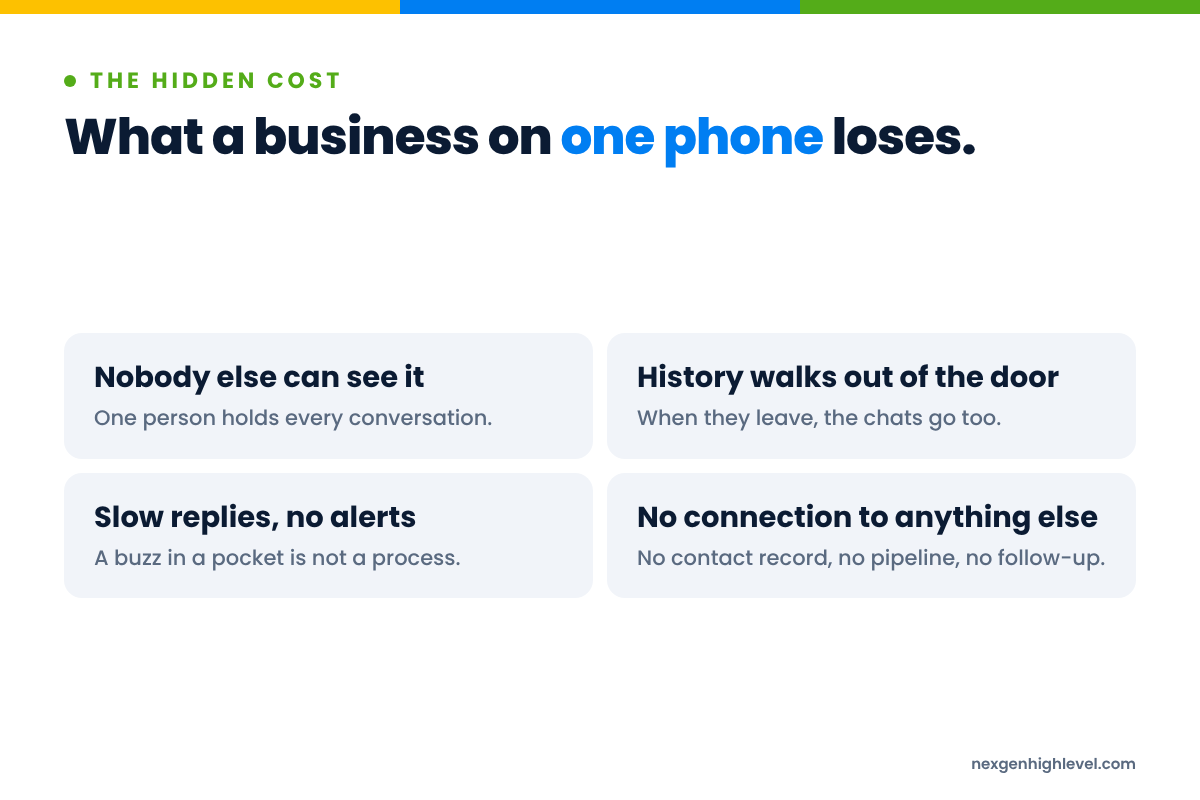
Nobody else can see it
A message on one person's phone is invisible to everyone else in the business. You can't share the load. You can't check the quality. You can't step in when someone's swamped.
And if you're the owner, you can't answer a very simple question: what's actually going on with our customers this week?
History walks out of the door
People leave. It happens in every business, and usually for perfectly good reasons.
But when a member of staff has been talking to customers from their own WhatsApp, the conversation history goes with them. So do the relationships. The customer doesn't know they've left. They just message the same number and wonder why nobody replies.
I've written more on that in who owns your business WhatsApp chats, because it deserves its own article.
Slow replies, no alerts
When WhatsApp lives on a phone, the speed of your reply depends on whether someone happens to look at it.
That matters more than most people realise. Dr James Oldroyd's Lead Response Management study, as reported by InsideSales, found the odds of a lead becoming qualified were 21 times greater when contacted within five minutes than at 30 minutes.
Five minutes. Not five hours. Not "when I get back from the school run".
I go into this properly in the reply nobody sent. The short version: if nobody gets told a message has arrived, nobody replies to it.
No connection to anything else
This is the one I find most frustrating.
The customer filled in a form on your website last month. They booked a call. They've opened three of your emails. They're in your pipeline as a decent-sized opportunity.
Then they message you on WhatsApp. And the person replying has no idea about any of that. It's like meeting someone at a party who you had lunch with last week, and introducing yourself.
Customers don't think in channels. They think "I'm talking to that business". If your business has six separate memories, one per channel, you'll keep introducing yourself.
It's not a messaging problem. It's a memory problem.
Here's the different way of thinking about it.
Most people think the WhatsApp question is "How do we send messages?" That bit's easy. Everyone already knows how to send a WhatsApp message.
The real question is: how does the business remember?
- Who is this person?
- What have we said to them, on every channel?
- What did we promise?
- What happens next, and who's doing it?
- Is this conversation worth money, and how much?
A phone can't answer those questions. It wasn't built to. It's a brilliant device for talking. It's a terrible filing cabinet.
When I started in recruitment, I had a telephone, a filing cabinet and a phone directory. No email. No CRM. The phone was where I talked to people. The filing cabinet was where the business remembered them. Every card had a name, a number and a few scribbled notes about what they wanted.
The phone was never the business. The cards were.
WhatsApp is the telephone. HighLevel is the filing cabinet, the diary and a very patient colleague who taps you on the shoulder when you've forgotten something.
Human, Strategy, Leverage
I always come back to my own framework. Human. Strategy. Leverage. In that order.
- Human. Your customer wants to talk to you on the app they already use, with a real person who remembers them.
- Strategy. So you decide which conversations belong on WhatsApp, who owns them, how fast you reply and what happens next.
- Leverage. Only then do you bring in the technology, so it happens every time, not just when the right person is in the building.
Technology is leverage, not strategy. Connect WhatsApp to a CRM without the first two and you'll just have a tidier version of the same mess.
One inbox: WhatsApp next to SMS, email and social in HighLevel
If you use HighLevel already, you'll know Conversations. It's the unified inbox: SMS, email and social messages in one place, attached to the contact they came from.
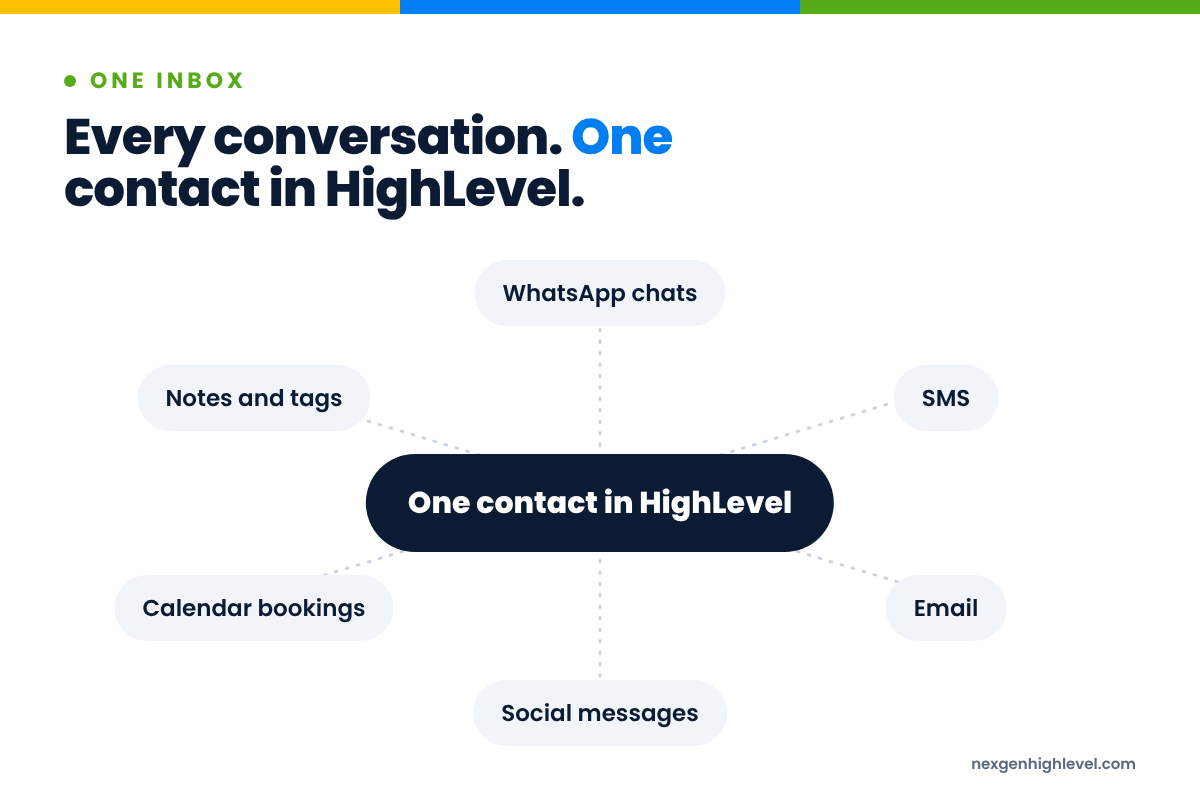
Now add WhatsApp to it.
That one change does more than it sounds like.
The customer gets one business, not six
When WhatsApp messages land in HighLevel Conversations alongside everything else, the person replying sees the whole picture. The form they filled in. The emails they opened. The appointment they booked and then moved. The text reminder they replied to.
So the reply isn't "Hi, how can I help?"
It's "Hi Sarah, are you still thinking about the Thursday slot we talked about?"
That's the difference between a business that's paying attention and one that isn't. And customers can feel it straight away.
The team shares the load
Once the conversations are in HighLevel, they're not stuck in a pocket. Someone can pick up a chat when a colleague is on lunch. A manager can see what's waiting. User roles and assignment mean the right person gets the right conversation, rather than everybody assuming somebody else has it.
The owner gets their evenings back
This is the bit nobody puts on a feature list.
When the business's WhatsApp is on your personal phone, you never really switch off. Every buzz could be a customer. You check it at dinner. You check it at the padel court. You check it at 11pm because you're not sure if you replied to the one from this morning.
When it's in HighLevel, with a team and a process around it, a buzz on your phone can just be your sister asking about Christmas.
Contact history, tags and workflows: what actually changes
Bringing WhatsApp into HighLevel isn't only about reading messages in a different window. It's about what the business can now do with them.
Here's what changes, in plain terms.
Every conversation belongs to a contact
In HighLevel, every WhatsApp conversation sits on a Contact record. That record can hold custom fields for the things that matter in your business: the service they're interested in, their budget, where they heard about you, when they last bought.
So the history isn't a scroll of chat bubbles on someone's phone. It's part of a proper customer record that anyone with access can understand.
Tags tell you where people are
Tags are simple and underrated. A tag on a contact can say:
- Asked about pricing on WhatsApp
- Opted in to WhatsApp updates
- Booked, not yet attended
- Customer, happy to give a review
- Interested, but not this quarter
Then smart lists can pull those people together so you can see, at a glance, everyone who's in the same place.
Workflows make sure the next step happens
Here's where it becomes leverage.
Workflows in HighLevel can respond to what happens in a conversation. A message arrives, and the right person gets an alert. Someone replies with a question, and they get tagged and added to a list for a call. Someone stops replying, and after a sensible gap a human gets a nudge to check in.
The point isn't to automate the relationship. It's to make sure the relationship doesn't depend on someone's memory on a busy Tuesday.
Pipelines put a value on the chat
And then Opportunities. When a WhatsApp conversation turns into a real chance of business, it can go into a pipeline with a value on it.
That's when you stop asking "How many chats did we have?" and start asking "How much revenue came through WhatsApp this month?" One of those questions is interesting. The other one pays the wages.
Picture it working
Imagine a home renovation company.
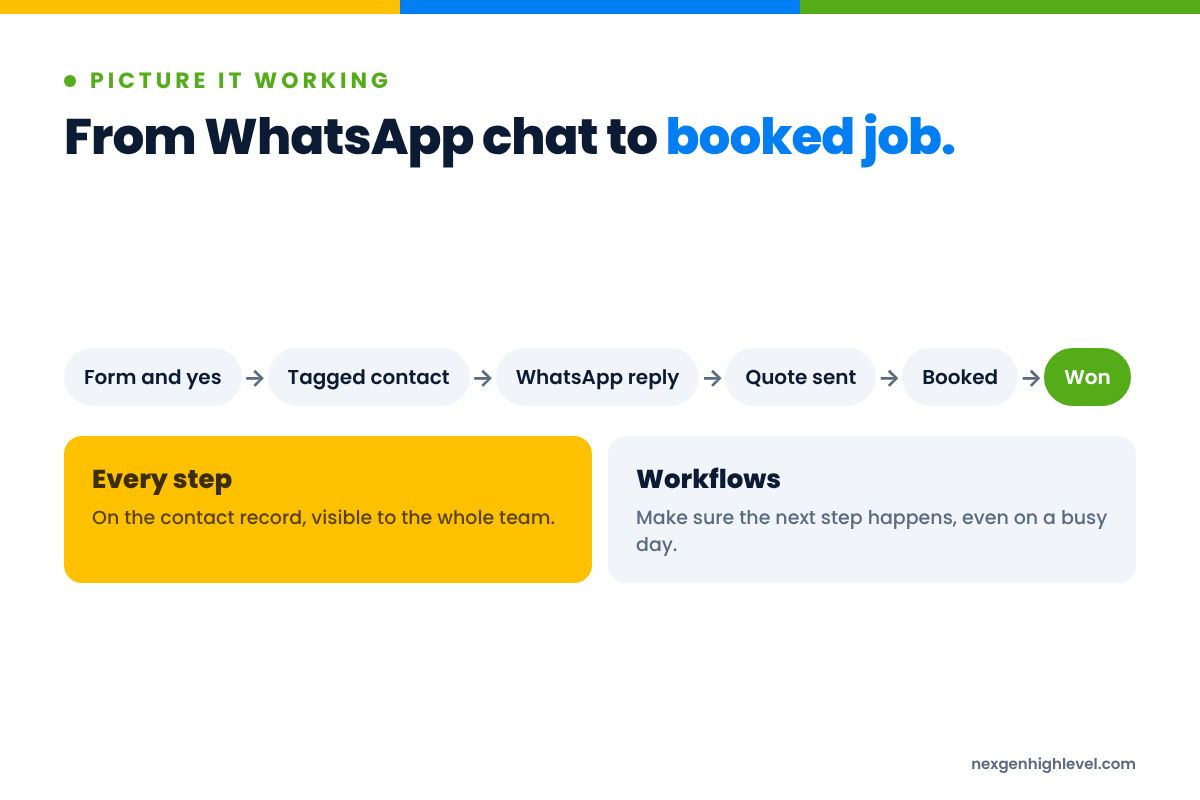
A homeowner fills in a quote form on the website and ticks the box to say they're happy to be contacted on WhatsApp. HighLevel creates the contact, tags the source and adds them to the pipeline.
A member of the team sends a friendly first message on WhatsApp. Short, human, one question: "Thanks for getting in touch. Is it the kitchen or the bathroom you're thinking about first?"
The homeowner replies with a voice message and two photos. It lands in Conversations on their contact record. The estimator sees it, books a visit in the calendar, and the appointment confirmation and reminder go out.
After the visit, the quote is sent. A workflow waits for a reply. If none comes after a few days, a person gets a task to follow up with a genuine question rather than "just checking in".
Nothing in that story is clever. It's just a business that remembers.
The WhatsApp App for HighLevel, in depth
So how do you actually get WhatsApp into HighLevel?
This is where I'll talk about what we've built, because it's the reason we built it. Feel free to skip ahead if you're not a HighLevel user. Everything else in this article stands on its own.
The WhatsApp App for HighLevel connects WhatsApp numbers to HighLevel. Here's what it does, no more and no less.
Connecting a number
You connect a WhatsApp number by scanning a QR code. There's no Meta Business API setup or template approval process needed to get started.
That matters for a lot of smaller businesses. Plenty of business owners have looked at connecting WhatsApp to their CRM, seen the word "API" and a list of approval steps, and quietly closed the tab.
To be fair, the WhatsApp Business Platform, the API route, is a real and established option. Larger businesses use it, with message templates and per-message pricing, and for some of them it's exactly the right fit. It's just not the only way to bring WhatsApp into the place your business already runs.
Several numbers in one sub-account
You can run several WhatsApp numbers, which we call connections, in one HighLevel sub-account.
Think about why that's useful. A sales number and a support number. A number for each location. A number for each person on the team who talks to customers. All in one account, all visible, instead of scattered across a drawer full of phones.
The things people actually do on WhatsApp
WhatsApp isn't just text. People send voice messages. They react with a thumbs up instead of typing "OK". They forward things. They talk in groups.
With the app, group messages, reactions, voice messages and forwarding all work inside HighLevel. So you're not forcing customers into a stripped-down version of WhatsApp because your system can only handle plain text.
That sounds like a small thing. It isn't. If a customer sends a voice message and your system can't handle it, someone ends up reaching for their phone again, and you're back where you started.
Workflow actions
The app adds WhatsApp actions to HighLevel Workflows:
- Send Message
- Send Group Message
- Wait for Reply
- Reply To Message
- Forward Message
- Mark As Read
Wait for Reply is the one I'd point people to first. Follow-up that pauses while you wait for someone to answer, and then does something sensible depending on whether they did, is the difference between a conversation and a sequence that keeps talking over the customer.
Workflow triggers
Workflows can also be triggered by WhatsApp messages: a message arriving on a specific connection, from a specific contact, or from a specific group.
So the support number can route to the support team. A message from a key client can alert their account manager straight away. A message in a project group can create a task. You decide the rules. HighLevel makes sure they happen.
For agencies
The app is white-label for agencies.
That covers both kinds of agency we work with. Service agencies can use it to run WhatsApp properly for clients. Agencies that sell HighLevel as a platform can offer it under their own brand for clients to use themselves.
Either way, the client gets their WhatsApp conversations inside the system they already run their business in. And the agency gets something that helps them deliver better results, which is the whole point.
Part of HighLevel, not a bolt-on
I want to explain why we built it this way, because it's the same reason behind everything we build.
When I first got into HighLevel in 2020, it opened my eyes to what marketing automation could do. HighLevel's line was "Capture, Nurture, Close". It's brilliant at what happens once someone shows interest.
But I kept noticing gaps. And I kept noticing that a lot of apps "built for HighLevel" weren't really part of it. They needed an API connection or an extra automation tool in the middle. Or they showed up as a page on a custom menu link that looked like HighLevel but didn't behave like it.
The LinkedIn App taught us this
Our first app was the LinkedIn App for HighLevel. We built it for one client who needed it.
The other LinkedIn tools out there all offered roughly the same basic outreach, and none of them sat inside HighLevel. So we built it natively, and added email enrichment, so users could find their ideal customer, enrich their email, reach them on LinkedIn and email, and nurture them.
For the first clients, outreach went up. So did leads, sales, revenue and profit.
And the bigger lesson was this: once the app was part of HighLevel, everything HighLevel already did well came along for free. Contacts. Tags. Workflows. Conversations. Pipelines. Reporting.
We made our app a part of HighLevel, rather than a complement to HighLevel.
Why that matters for WhatsApp
The same thinking went into the WhatsApp App.
WhatsApp messages land in Conversations. They sit on Contacts. They can be tagged. They can trigger Workflows. The WhatsApp actions sit right beside the email and SMS actions you already use.
That's what I mean by part of HighLevel. You don't learn a new system. You don't manage another login. You don't build a fragile chain of tools that breaks the week you go on holiday.
Technology should earn its place in somebody's business. The way it earns it is by fitting into how you already work, not asking you to work around it.
If you want to see the rest of what we've built, and what's coming next, it's all on our HighLevel apps page.
The house rules don't change when WhatsApp is in HighLevel
Now the bit I'd underline twice if I could.
Putting WhatsApp inside HighLevel gives you more power. More power means more responsibility. And WhatsApp has very clear rules.
WhatsApp is a personal space
You're a guest on WhatsApp. People invite you into the same app they use to talk to their mum. If you behave like a billboard in there, you'll be shown the door.
WhatsApp's Business Messaging Policy is plain about it. You may only contact people on WhatsApp if "they have given you their mobile phone number or username" and "you have received opt-in permission from the recipient confirming that they wish to receive subsequent messages" from you.
You "must respect all requests (either on or off WhatsApp) by a person to block, discontinue, or otherwise opt out".
And: "If content or actions violate our terms or policies, we may limit or remove your access to our services."
No bulk, no blasting
WhatsApp's Terms of Service forbid "sending illegal or impermissible communications such as bulk messaging, auto-messaging, auto-dialing, and the like."
So let's be straight about it. Numbers that spam get restricted or banned. No tool changes that, including ours. Nobody can make a WhatsApp number ban-proof, and you should be wary of anyone who says they can.
That means:
- No bought lists.
- No scraped numbers.
- No messaging people who haven't said yes.
- No mass blasts to your whole database because you've got a promotion on.
Where cold outreach belongs
If you need to reach people who don't know you yet, that's a job for LinkedIn and email. That's the front end of the journey: prospecting, outreach, market creation.
WhatsApp is where the relationship continues once someone has said yes.
Get that order right and everything gets easier. Get it wrong and you'll lose a number you've spent years building up, with every customer conversation on it.
I've written a whole article on this: you're a guest on WhatsApp, act like one. It covers how to collect consent properly with forms, conversations and tags in HighLevel.
Use the system to protect the relationship
Here's the thing people miss. HighLevel is a good place to make sure you follow the rules, not break them.
- A form with a clear WhatsApp opt-in can tag the contact, so you know who said yes.
- A tag can record when someone asks you to stop, and workflows can respect it.
- Wait for Reply means your follow-up waits for the person, rather than talking at them.
- Conversations show you exactly what's been said, so nobody sends the same "just checking in" message three times.
Technology multiplies whatever is underneath it. Put it behind respect and permission, and it multiplies good conversations. Put it behind a spammy habit, and it just gets you banned faster.
Before you connect a number: questions to ask yourself
Before you connect anything, take half an hour with a coffee and answer these. Honestly.
About your customers
- Which customers actually want to talk to us on WhatsApp? Not everyone does.
- What do they use it for? Quick questions? Booking? Sending photos? Complaints?
- Have they given us their number and agreed to hear from us? How do we know?
About your team
- Which numbers are customers messaging today? Include personal phones. Be honest.
- If someone left tomorrow, which conversations would leave with them?
- Who owns each kind of conversation? Sales, support, bookings, accounts?
- How fast do we reply now, really? And how fast do we want to?
About your system
- Will a WhatsApp message land on the same contact record as their emails, texts and form submissions?
- When a message arrives, who gets told?
- What's the next step after a first conversation? Is it written down anywhere?
- How will we know which WhatsApp conversations turned into revenue?
About you
And one for the owner.
- How many evenings this month did you spend answering business WhatsApps on your own phone?
If the answer to that makes you wince, it's probably the strongest reason in this whole list.
Know your goal, plan properly, set up properly, understand properly. Then go for it.
Walk before you run
One more thing, from someone who learned it the hard way.
When I grew my recruitment business, I grew it fast, with heavy overheads, and I never foresaw the world just stopping. Then Covid came, and the business didn't survive.
I'm not suggesting that connecting WhatsApp to HighLevel is quite the same stakes. But the principle travels. Don't connect six numbers, build twenty workflows and roll it out to the whole team on a Monday morning.
Start with one number and one kind of conversation. Get the basics working. See what your customers do. Then add the next one.
Walk before you run. And even when you're ready to run, keep walking for a little bit longer.
Frequently asked questions
Can I connect WhatsApp to HighLevel?
Yes. With our WhatsApp App for HighLevel, you connect a WhatsApp number by scanning a QR code, and conversations come into HighLevel Conversations alongside SMS, email and social. There's no Meta Business API setup or template approval process needed to get started. From there, messages sit on contact records and can be used in workflows. The bigger question is what you'll do with it, so plan that first.
Do I need the WhatsApp Business API to use WhatsApp in HighLevel?
Not with our app. You can get started by scanning a QR code, without the Meta Business API or template approvals. The WhatsApp Business Platform, the API route, is a real option that larger businesses use, with templates and per-message pricing, and it suits some of them well. It's just not the only way. Pick the route that fits how your business actually talks to customers.
Can I use more than one WhatsApp number in HighLevel?
Yes. The WhatsApp App for HighLevel lets you run several WhatsApp numbers, which we call connections, in one sub-account. That's useful for separating sales and support, running different locations, or giving each team member their own number while the business keeps sight of every conversation. Workflows can also be triggered by messages arriving on a specific connection, so each number can follow its own rules.
Can I send bulk WhatsApp messages from HighLevel?
You shouldn't, and WhatsApp doesn't allow it. Its Terms of Service forbid bulk messaging and auto-messaging, and numbers that spam get restricted or banned. No tool makes a number ban-proof, ours included. Only message people who gave you their number and agreed to hear from you, and respect anyone who asks you to stop. Use LinkedIn and email for cold outreach. WhatsApp is for people who've already said yes.
Will my team still be able to send voice messages and use groups?
Yes. With the WhatsApp App for HighLevel, group messages, reactions, voice messages and forwarding all work inside HighLevel. That matters, because people don't just type on WhatsApp. They send voice notes, react with a thumbs up and talk in groups. If your system can't handle that, somebody ends up reaching for their phone again, and you're back where you started.
Is the WhatsApp App for HighLevel available for agencies?
Yes, it's white-label. Service agencies can use it to run WhatsApp properly for their clients, and agencies that sell HighLevel as a platform can offer it under their own brand for clients to use themselves. Either way, the client's WhatsApp conversations sit inside the HighLevel account they already run their business from, with contacts, tags and workflows working together.
The phone was never the business
I still think about that filing cabinet from my recruitment days.
The phone on the desk mattered. It was how I talked to people. But if someone had taken the phone away, I'd have got another one by the afternoon. If someone had taken the filing cabinet, I'd have lost the business.
That's the question I'd leave you with. Right now, in your business, which one is WhatsApp: the phone or the filing cabinet?
If it's both, that's the risk.
Keep the conversations on WhatsApp, because that's where your customers want them. Keep them personal, because that's what WhatsApp is. Only message people who've said yes. Reply quickly. Remember what they told you.
But give the business its memory back. Put it somewhere the whole team can see it, act on it and build on it. For us, that's HighLevel. If you're not on HighLevel yet, you can create a HighLevel account through NexGenHighLevel and start with one number.
People buy from people. They just shouldn't have to introduce themselves twice.
Your WhatsApp can live on a phone. Your business shouldn't.