
Who Owns Your Business WhatsApp Chats?
Picture a salesperson handing in their notice on a Friday afternoon. Good person, leaving on decent terms. You shake hands, and they walk out the door with their bag and their phone.
On that phone are two years of WhatsApp conversations with your customers. That's the quiet problem with WhatsApp for sales teams.
The quotes. The voice notes. The "let's pick this up after the summer". All of it has just gone home with someone who no longer works for you. Nobody planned it. It happened one chat at a time, on phones the business doesn't own.
So here's a question worth sitting with for a few minutes. Who actually owns your business WhatsApp chats?
Because if the honest answer is "whoever's holding the phone", you don't have a sales channel. You have a collection of private relationships that happen to involve your customers.
The day a salesperson leaves, the chats leave too
Nobody did anything wrong. The salesperson didn't steal anything. You didn't forget to do anything obvious. A customer wanted to talk on WhatsApp, the salesperson had WhatsApp, and the conversation started. Then another. Then a few hundred.
It felt efficient. Customers loved it. And all the while, the history of those deals was building up somewhere the business couldn't see.
What actually walks out of the door
It isn't just messages. It's context.
- What was promised. A price held until the end of the month. A delivery date. A "leave it with me".
- What the customer cares about. The fussy finance director. The owner who only decides on a Friday. The one who hates phone calls.
- Where each conversation had got to. Waiting on a quote. Waiting on a decision. Waiting on a spouse.
- The tone of the relationship. Voice notes, jokes, the photo of the dog. The stuff that makes a customer feel like they're dealing with a person, not a company.
That last one matters. People buy from people. When the person goes, the customer is left with a stranger asking questions they answered months ago.
The awkward questions on the Monday
Then Monday comes. Who were they talking to this week? Which deals were close? Did anyone ask for a call back? Has a customer messaged them over the weekend, got no reply, and quietly decided to go elsewhere?
You won't know. Not because anyone is hiding anything. Because the information was never in the business to begin with.
In recruitment, the relationships were the business. I had a telephone, a filing cabinet and a phone directory, and the filing cabinet mattered because it stayed in the office. A WhatsApp chat on a personal phone is a filing cabinet that goes home every night. Most nights it comes back. One day it won't.
Why WhatsApp for sales teams usually starts on personal phones
I want to be fair to everyone here, because this isn't a story about careless business owners or sneaky staff.
WhatsApp is where people actually talk. Meta says more than 3 billion people use WhatsApp. Back in 2023 it said 1 billion people message a business each week across its apps. Customers don't want to fill in a form and wait for an email. They want to send a quick message to someone they've already spoken to.
So it starts innocently.
A customer says, "Can I just WhatsApp you?" The salesperson says yes, because saying no feels rude and slow. And it works brilliantly, right up until it doesn't.
How it usually happens
There are a few common routes, and you may recognise yours.
- The personal number route. Each salesperson uses their own phone and their own WhatsApp. Customers save "Dave from the showroom" in their contacts.
- The shared phone route. There's one "office phone" with WhatsApp on it, sitting on a desk or in someone's drawer. Whoever's nearest answers it. Or nobody does.
- The owner's phone route. Everything goes to the owner, who replies at 11pm from the sofa, and forwards things to staff with "can you deal with this?"
- The mixture. All three, depending on who the customer first spoke to and when.
None of these is mad. Each solved a real problem at the time. Most business systems aren't designed. They accumulate.
It's a big ask of your staff, too
There's another side to this that doesn't get talked about enough.
When you let your team sell from their personal WhatsApp, you're asking them to mix their private life with your customers. Their family group chat sits next to a customer complaint. Their weekend gets interrupted by a "quick question" at 9pm on a Saturday. Their personal number is now in the phones of people they may not want having it a year from now.
Some people are fine with that. Plenty aren't, and won't say so.
People are more important than money. That cuts both ways. Respecting your customers means not losing their history. Respecting your staff means not quietly turning their personal phone into company property.
It's not a phone problem. It's an ownership problem.
When business owners notice this, they jump straight to the tool question. "What app should we use?" It's the wrong first question.
Most businesses don't have a technology problem. They have a thinking problem. And the thinking problem here is simple: nobody ever decided who owns the conversation.
Whose customer is it?
Let's be clear about something that can feel a bit uncomfortable.
The customer relationship belongs to the business. The salesperson looks after it, builds it, often makes it what it is. But the customer chose to buy from your business, the business delivers the work, and the business carries the responsibility if something goes wrong.
That doesn't make the salesperson less important. Far from it. A great salesperson is the reason many customers stay. But a business where the relationship only exists inside one person's phone is a business built on hope.
It's not about trust. It's about continuity.
Who did the customer say yes to?
Here's a question I find genuinely interesting, and I don't think many people have thought about it.
On WhatsApp, permission matters. WhatsApp's Business Messaging Policy says you may only contact people if they've given you their number and you've received opt-in permission confirming they want to receive messages from you.
So when a customer gave their number to Dave from the showroom, who did they say yes to? Dave? Or the business Dave works for?
If Dave leaves and someone else picks up the chat from a different phone, is that the same conversation the customer agreed to? Or is it a stranger turning up uninvited?
There's no tidy answer. But it's a strong argument for the business owning the number and the conversation from day one. When the customer opts in to hearing from your business, on a number that belongs to your business, the conversation can carry on properly when people change. I wrote about consent in detail in You're a Guest on WhatsApp. Act Like One., and it's worth reading alongside this one.
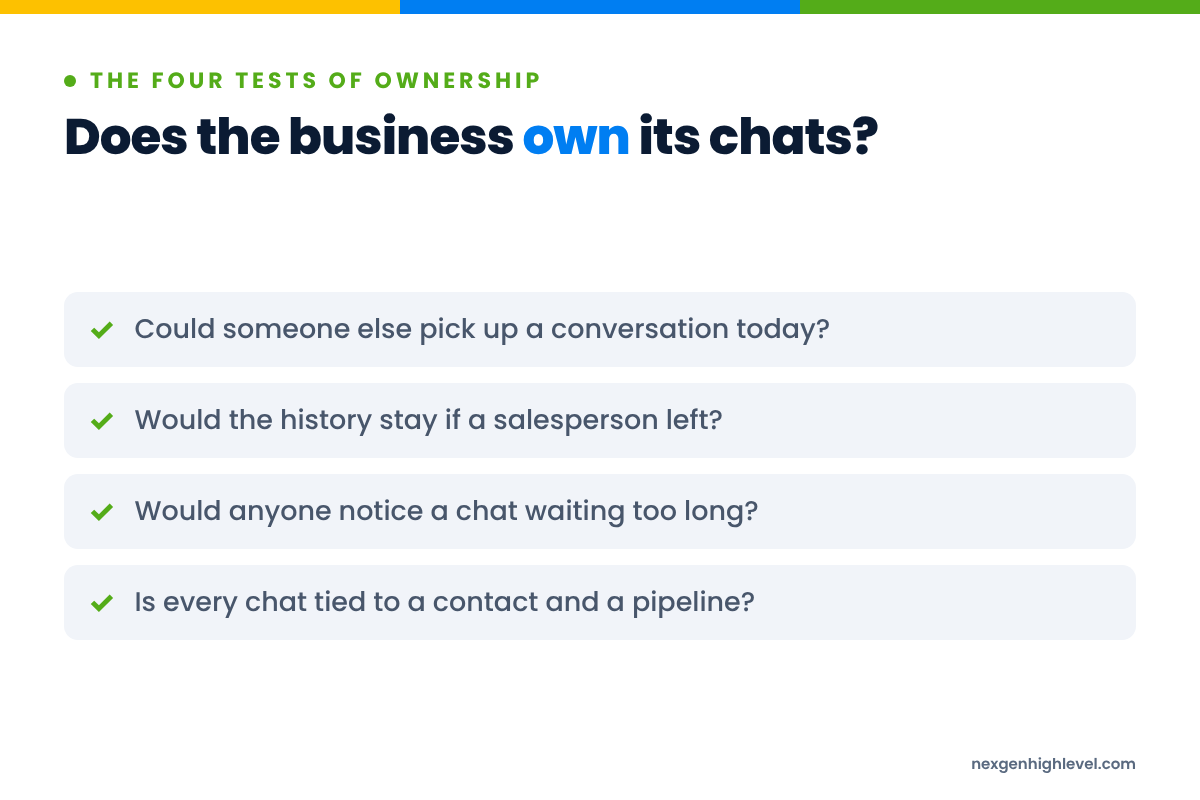
The four tests of ownership
So what does "owning" a business WhatsApp conversation actually mean? I'd put it as four simple tests. If you can say yes to all four, you own it. If not, you're borrowing it.
- Visibility. Can someone other than the person holding the phone see the conversation when they need to? A manager, a colleague covering holidays, you.
- Continuity. If that person is off sick tomorrow, on holiday next week or gone next month, can the conversation carry on without the customer noticing a gap?
- History. Is the conversation attached to a customer record, alongside their emails, calls, quotes and deals, so the next person starts from what's already known?
- Permission. Do you know who opted in, to what, and when, and can you respect it if they ask to stop?
Notice that none of these is about technology. They're about the business deciding how it wants to work. Technology just makes them possible at scale.
Several numbers, one team: designing your WhatsApp setup
Before we get to tools, it's worth thinking about shape. How many numbers do you actually need, and what's each one for?
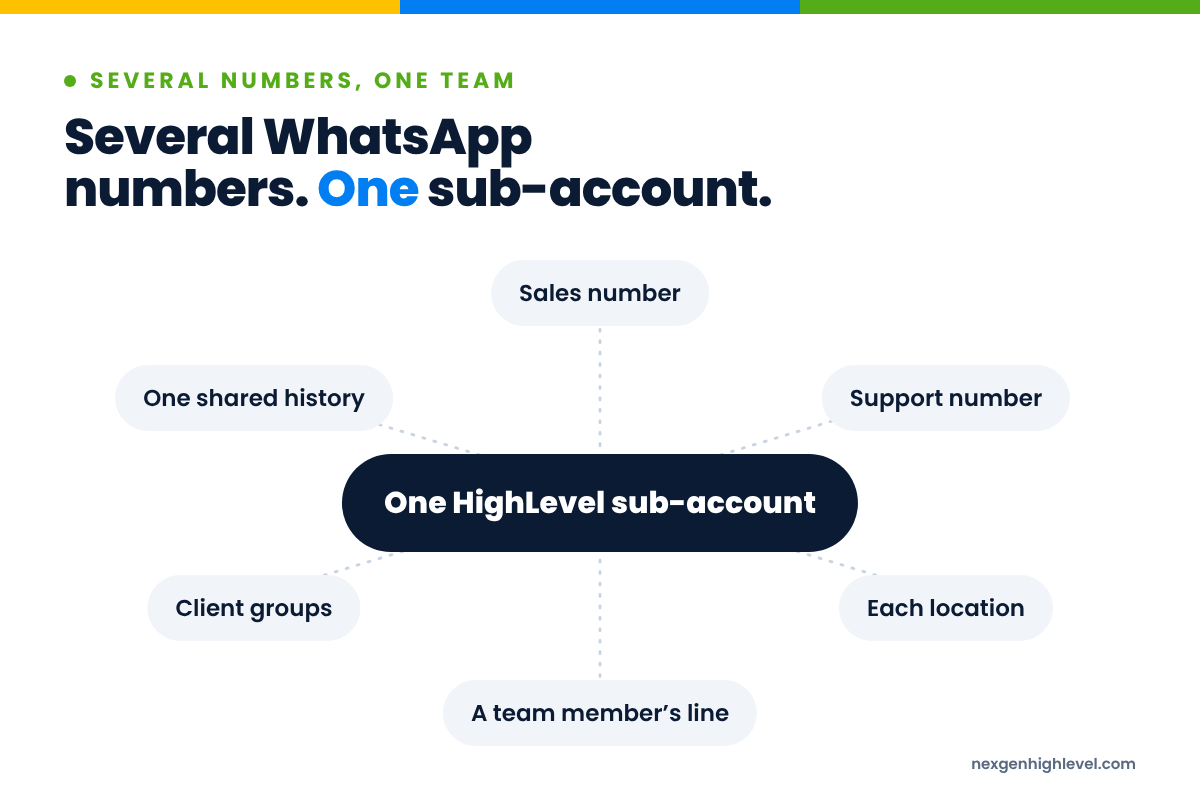
Common ways to organise team numbers
- One number for the whole business. Simple. Customers have one place to go. Works well for smaller teams where anyone can answer anything. The risk is that it becomes the "office phone" nobody owns.
- One number per function. Sales on one, support or bookings on another. Customers get a clear route, and the right people see the right messages.
- One number per location. A business with several sites often wants customers talking to their local team, who know the place, the people and the parking.
- One number per salesperson, owned by the business. Some sales relationships are genuinely personal and long-running. A dedicated number per person keeps that feel, but the business owns the number, so the chats stay when the person moves on.
Questions to ask yourself
Before you set anything up, try answering these honestly.
- When a new customer messages, who should see it first? Who should reply?
- When an existing customer messages, should it go to "their" person, or to whoever's free?
- What happens out of hours? Who covers holidays and sick days?
- Which conversations does a manager need to see, and which don't they?
- Which customers are in group chats rather than one-to-one, and who looks after those?
- How will you know if a message has sat unanswered?
That last one is where real money disappears. Dr James Oldroyd's Lead Response Management study, as reported by InsideSales, found the odds of a lead becoming qualified were 21 times greater when contacted within five minutes than at 30 minutes. Now picture a hot enquiry sitting on the phone of someone who's on a beach in Greece. It's not five minutes. It's a week.
The design comes first. Human. Strategy. Leverage. In that order.
Bringing your team's WhatsApp numbers into HighLevel
Once you know the shape you want, this is where HighLevel earns its place.
If you run your business in HighLevel, your Contacts, Conversations, Opportunities and Workflows are already in one place. WhatsApp, the channel your customers may use most, often isn't. It lives on phones.
That's the gap we built the WhatsApp App for HighLevel to fill. I covered the wider "one phone versus the business" problem in Your WhatsApp Lives on a Phone. Your Business Shouldn't.. Here I want to look at it specifically through the eyes of a sales team.
What the app does for a team
Here's what it does, plainly.
- You connect WhatsApp numbers to HighLevel by scanning a QR code. There's no Meta Business API setup or template approval process needed to get started.
- Several numbers can run in one sub-account. We call each one a connection. So your sales line, your support line and your account managers' numbers can all sit in the same HighLevel account.
- The way people actually use WhatsApp still works. Group messages, reactions, voice messages and forwarding work inside HighLevel. A sales conversation on WhatsApp is rarely just text, and it shouldn't have to be.
- WhatsApp becomes part of your Workflows. The workflow actions include Send Message, Send Group Message, Wait for Reply, Reply To Message, Forward Message and Mark As Read.
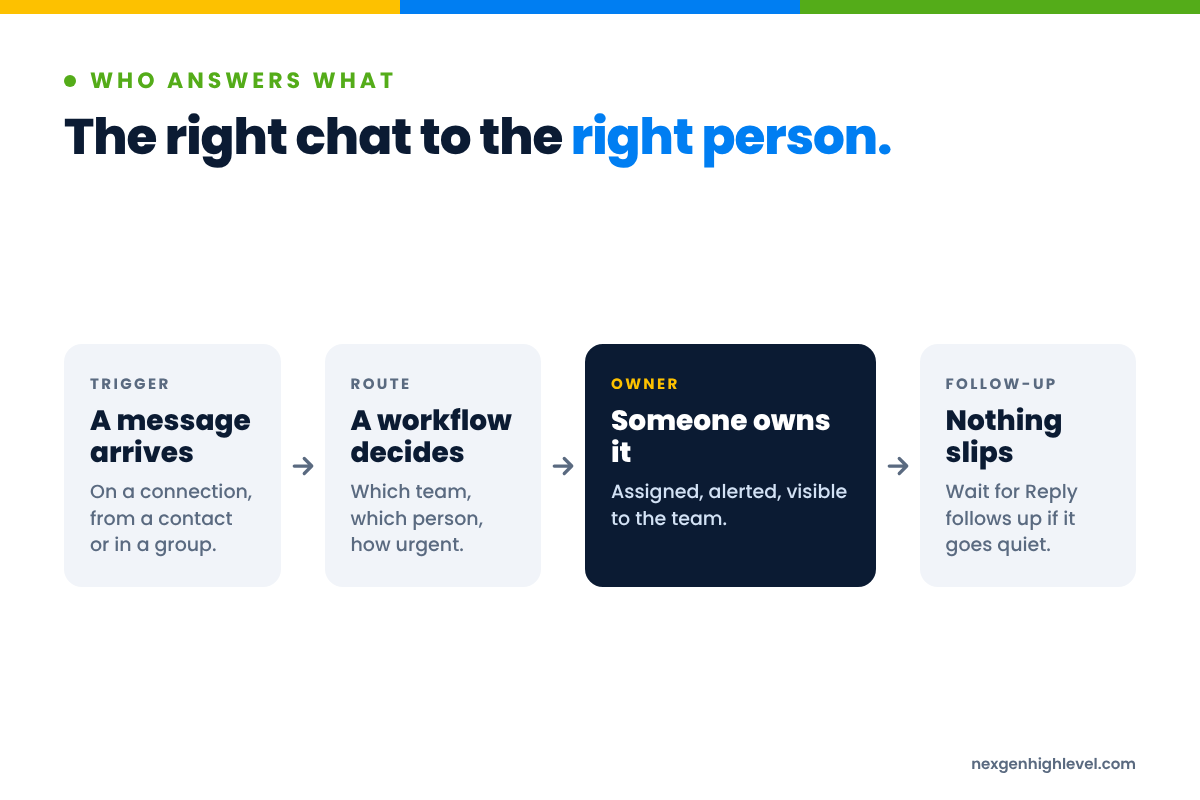
- Workflows can start from WhatsApp messages. They can be triggered by messages arriving on a specific connection, from a specific contact, or from a specific group.
- It's white-label for agencies. More on that further down.
Why "part of HighLevel" matters so much here
When I built the LinkedIn App, it started because one client needed it. Every other LinkedIn tool offered the same basic outreach, and none of them sat inside HighLevel. They needed APIs and third-party connectors to talk to it, or they showed up as a page in a menu and nothing more.
We made our app a part of HighLevel, rather than a complement to HighLevel. We took the same view with WhatsApp.
For a sales team, this is the bit that matters. If WhatsApp lives in a separate tool, you've moved the chats off personal phones and into another silo. Better than before, but you've still got two places to look and two histories to piece together.
When WhatsApp messages sit in HighLevel, they sit with everything else you know about that customer: the tags, the custom fields, the opportunity, the calendar booking, the emails. That's what makes the four ownership tests possible.
A note on the official API route
Larger businesses sometimes go a different way: the WhatsApp Business Platform, Meta's API route, which uses approved message templates and per-message pricing. It's a real, official option and it suits some organisations well.
Which route suits you depends on your size, your volume and how you work. Neither changes the rules about permission.
Routing, assignment and triggers: who answers what
This is where the design from earlier becomes real. You decided who should see what. Now the system can make it happen without someone sitting there sorting messages by hand.
The scenarios below are examples to get you thinking, not instructions.
Triggers by connection
Because workflows can be triggered by messages arriving on a specific connection, each number can behave differently.
Picture a home improvement business with two numbers: one for new enquiries and one for existing customers.
- A message on the enquiries number could start a workflow that creates or updates the contact, tags them as a new WhatsApp enquiry, creates an opportunity in the sales pipeline, assigns it to whichever salesperson covers that area, and notifies them.
- A message on the customer number could tag the contact as an existing customer and route it to the account manager or the service team instead.
Same app. Same account. Two very different journeys, decided by the number the customer chose to message.
Triggers by contact
Workflows can also be triggered by messages from a specific contact.
Think about your most important accounts. The ones where a missed message would genuinely hurt. A message from one of them could alert the account manager and their manager, rather than waiting in a queue with everything else.
Triggers by group
Group chats are more common in sales than people admit. A customer adds their business partner. A project group includes the client, your installer and your project manager. A trade customer has a group with your team for orders.
Because workflows can be triggered by messages from a specific group, those conversations don't have to rely on someone remembering to check. A message in a project group could notify the project manager. And with Send Group Message as a workflow action, updates can go back into that group from HighLevel too, when it makes sense.
Wait for Reply: the follow-up nobody forgets
Here's one I really like for sales teams.
A salesperson sends a quote and asks a question. Then life happens. Two weeks later, nobody's followed up, and the customer has bought somewhere else.
With Wait for Reply, a workflow can wait to see whether the customer answers. If they do, the conversation carries on as normal. If they don't, after a sensible amount of time, the workflow can create a task for the salesperson to check in personally, or send a gentle, human follow-up to someone who has already asked to hear from you.
Notice what that is. It's not chasing. It's remembering. My memory is terrible, so I need all the help I can get.
The smaller actions earn their place too. Picture a customer sending a photo of the problem: Forward Message can get it to the person who'll fix it, instead of it sitting with the person who happened to receive it.
Assignment, roles and visibility
None of this works without being clear about people.
HighLevel already has user roles and assignment. Contacts and opportunities can be assigned to users, and workflows can do that assigning for you based on the rules you decided. That gives you answers to the questions that used to be impossible:
- Who's looking after this customer?
- What did they last say, and when?
- Which conversations haven't had a reply?
- If someone's off tomorrow, who picks this up?
And on the Friday afternoon when someone hands in their notice? The conversations are still in HighLevel. The history is still attached to the contact. You reassign their contacts and opportunities, the new person reads back through the chat, and the customer gets someone who already knows the story.
That's ownership.
The handover message, done properly
One more thing on that, because it's where the human part shows up.
When the person changes, tell the customer. Don't just let a new name start replying as though nothing happened. A short, honest message does the job. For example:
"Hi Sarah, it's Mark from [business]. Just to let you know, Lisa has moved on and I'm looking after your account now. I've read through everything you've discussed, so you won't need to repeat yourself. The kitchen survey is still booked for Thursday. Any questions, just message me here."
That's an example, not a script. But look at what it does. It respects the relationship, explains the change, proves the history wasn't lost, and gives the customer a reason to trust the new person.
The system kept the history. The person still has to make it feel human.
More people, same rules: WhatsApp policy for teams
Here's where I need to be very straight with you, because it matters for your business and for your number.
More numbers and more people should not mean more messages to more strangers.
WhatsApp is a personal space. People are letting you into the same app they use to talk to their family. That's a privilege, and it comes with rules.
What WhatsApp's rules actually say
- The Business Messaging Policy says you may only contact people if they've given you their number and you've received opt-in permission confirming they want to hear from you.
- The same policy says you must respect all requests, on or off WhatsApp, to block, discontinue or otherwise opt out. And it says that if content or actions violate their terms or policies, they may limit or remove your access.
- WhatsApp's Terms of Service forbid "sending illegal or impermissible communications such as bulk messaging, auto-messaging, auto-dialing, and the like."
In plain words: numbers that spam get restricted or banned. No tool, including ours, makes a number "ban-proof" or safe from that. Anyone who tells you otherwise is selling you something.
Why teams are higher risk than individuals
A single salesperson on their own phone is usually careful. They'd feel awkward messaging someone who didn't want to hear from them.
A team with several numbers and some automation is different. One person exports a list. Another decides a "quick update to everyone" would be a good idea. A third sets up a workflow without thinking about who's in the audience.
That's how a business gets into trouble. Not through bad intent. Through nobody owning the rules.
So decide them, write them down, and make sure everyone with access to your WhatsApp numbers knows them:
- We only message people who gave us their number and agreed to hear from us.
- We record that permission in HighLevel, with a tag or custom field, so anyone can see it.
- We never message bought lists, scraped numbers or people who haven't opted in.
- We never blast. Messages go to people with a reason to receive them.
- When someone says stop, we stop, and we record it.
Where cold prospecting belongs
If your sales team needs to find new people, that's a perfectly good goal. It just doesn't belong on WhatsApp.
Cold outreach belongs on LinkedIn and email, where people expect to hear from businesses they don't know yet. I've written about LinkedIn outreach messages that start real conversations, and that's where your prospecting energy should go.
WhatsApp is where a relationship continues once someone has said yes. Earn the conversation somewhere else, then move it to WhatsApp when they invite you.
You're a guest. Behave like one.
For agencies: running WhatsApp for clients under your own brand
If you run an agency, everything above applies to your clients, often with more mess.
Picture a clinic with a front desk of four people, each with their own phone. Or a trades business where the owner, two estimators and the office manager all talk to customers on WhatsApp.
Those are exactly the businesses that feel the Friday afternoon problem. And exactly the businesses that need someone to help them design the answer, not just install a tool.
Delivery, not just installation
Back in my agency days, we built whole marketing systems for clinics, mostly in the US private medical sector. We saw practices stuck on one channel, with no-shows and cancellations climbing, and agency after agency trying to fix the same Facebook ads. The real problems were often further down the journey: unanswered phones, slow call-backs, follow-up that depended on someone remembering.
WhatsApp for a client's team is the same kind of work. The tool is the easy part. The value is in helping the client answer the questions from earlier: how many numbers, who answers what, how permission is recorded, what happens when someone leaves.
Learn your craft before you learn how to sell it. If you can walk a client through those four ownership tests and build their HighLevel setup around the answers, you're delivering something genuinely useful.
Why white label matters
The WhatsApp App for HighLevel is white-label for agencies. That suits both kinds of agency we work with.
- Service agencies that run the system for clients can deliver WhatsApp as part of the client's HighLevel setup, under the agency's own brand.
- Agencies selling HighLevel as a platform can give their clients WhatsApp inside the account they already use, as part of what the agency provides.
Either way, the client experiences it as part of the system you deliver, not as yet another separate tool they have to log into. You can see the rest of what we've built, and what's on the way, on our HighLevel apps page.
And a word of caution, because I'd rather say it than not. If you run WhatsApp for clients, you also help set the rules. A client's number getting restricted because their team blasted a bought list is a problem for them and for you. Put the permission rules into the onboarding, and walk away from a client who insists on breaking them. It's OK to walk away from a deal.
Frequently asked questions
Should my sales team use their personal WhatsApp for work?
I'd steer away from it where you can. It's convenient at first, but the business can't see the conversations, can't cover holidays or sickness, and loses the history when someone leaves. It also asks a lot of your staff, mixing their private life with your customers. A business-owned number, with conversations kept in a system like HighLevel, protects customers, staff and the business at the same time.
Can a whole team share one WhatsApp number?
Yes, and for many smaller businesses it's the simplest place to start. The risk is the "office phone" problem: everyone assumes someone else has replied. If you share a number, make it clear who's responsible for each conversation. In HighLevel, you can assign contacts and opportunities to people and use workflows to flag messages that haven't had an answer, so nothing quietly falls between two desks.
How do I manage several WhatsApp numbers in one place?
Decide what each number is for first: sales, support, a location or a person. Then bring them into one system. With the WhatsApp App for HighLevel, several numbers can run as separate connections in one sub-account, and workflows can be triggered by messages arriving on a specific connection. That lets each number follow its own journey while the whole team works from one place.
What happens to WhatsApp chats when an employee leaves?
If they used their personal phone, the chats usually go with them, along with the context of every deal. If conversations are kept in HighLevel against the customer's record, you reassign their contacts and opportunities to someone else, and that person reads back through the history. Then send the customer a short, honest message about the change. The relationship continues instead of starting again.
Can my sales team use WhatsApp for cold outreach?
No. WhatsApp's Business Messaging Policy says you may only message people who've given you their number and opted in to hear from you, and its Terms of Service forbid bulk messaging and auto-messaging. Numbers that spam can be restricted or banned. Do your prospecting on LinkedIn and email, where people expect to hear from businesses they don't know, and move to WhatsApp once someone invites you.
Can agencies offer WhatsApp to clients under their own brand?
Yes. The WhatsApp App for HighLevel is white-label for agencies, so it can sit inside a client's account as part of what you deliver. The bigger opportunity is the thinking around it: helping clients decide how many numbers they need, who answers what and how permission is recorded. Get that right and the tool becomes genuinely useful rather than just another login.
Whose number is it anyway?
I'll finish where I started, with that Friday afternoon.
People leave. It's normal. It's often healthy. Good people move on to bigger roles, new cities, different lives, and you should be able to shake their hand and mean it when you wish them well.
What shouldn't happen is that your customers' history leaves with them.
That's not a technology question at its heart. It's a decision. Decide that conversations with your customers belong to the business. Decide how they're shared, who looks after them and what the rules are. Then use technology, HighLevel in our case, to make that decision stick, every day, without anyone having to remember. If you're not on it yet, you can create a HighLevel account through NexGenHighLevel. But start with the decision, and walk before you run.
People buy from people. That will probably never change. But the person your customer is talking to should be able to change without the customer losing anything.
Your people build the relationship. Your business should own the conversation.