LinkedIn and Email Outreach: One Channel Isn't a Strategy
Most businesses treat LinkedIn and email outreach as two separate jobs. Two lists. Two inboxes. Sometimes two different people who never talk to each other.
And then they wonder why neither one is working.
When my agency worked with private medical practices in the US, we kept meeting the same kind of client.
They'd relied on one channel for years, nearly always Facebook Ads. At first it had worked brilliantly. Then, slowly, it got worse. Costs went up. No-shows went up. Cancellations went up. The leads that did come through were often bargain hunters who never turned into proper patients.
So they'd hire a new agency. And the new agency would promise to fix... the Facebook Ads. Same channel, new settings. Six months later, same results, and they'd hire another one.
Some of them had been through four or five agencies in a year. Every one of them had been asked to fix the same channel.
Most of the time, we didn't tweak anything. We rebuilt from the ground up. Not because Facebook Ads were bad, but because one channel on its own was never going to be enough.
I see exactly the same thing happening with LinkedIn now. Different channel, same mistake.
The one-channel trap
Here's how it usually goes.
A business owner decides LinkedIn is the answer. Fair enough. There are more than 1 billion members on LinkedIn in more than 200 countries and territories. Your customers are almost certainly in there somewhere.
So they fix the profile. They send connection requests. They post a few times a week. Maybe they get some replies. Maybe a call or two.
And then it plateaus.
The acceptance rate drops. The replies dry up. The people who did reply go quiet after the second message. Six months in, the verdict comes back: "LinkedIn doesn't work for us."
What they often mean is something slightly different. They mean "LinkedIn on its own, with nothing around it, didn't turn strangers into customers."
Well, no. Neither would anything else.
It's the clinic story again. The problem was never really the channel. The problem was asking one channel to do the whole job.
Why one channel always runs out of road
Every channel has a ceiling. Not because it's broken, but because of what it is.
- LinkedIn has limits you don't control. LinkedIn applies weekly limits to connection invitations. Around 100 a week is commonly reported, but LinkedIn doesn't publish a fixed number and it varies by account. Either way, you're working inside a fence.
- LinkedIn messages are easy to miss. People check LinkedIn when they check LinkedIn. Some do it daily. Some do it once a fortnight. Some open it on the train, read your message, mean to reply and never do.
- Attention moves around. The person you want might be on LinkedIn on Monday, in their inbox all day Tuesday, and on the phone with a supplier on Wednesday. If you only exist in one of those places, you only exist a third of the time.
None of this is a criticism of LinkedIn. I'd say exactly the same about Facebook Ads, or Google, or email on its own.
One channel isn't a strategy. It's a bet.
Customers don't live in channels
Think about how you actually buy something important for your business.
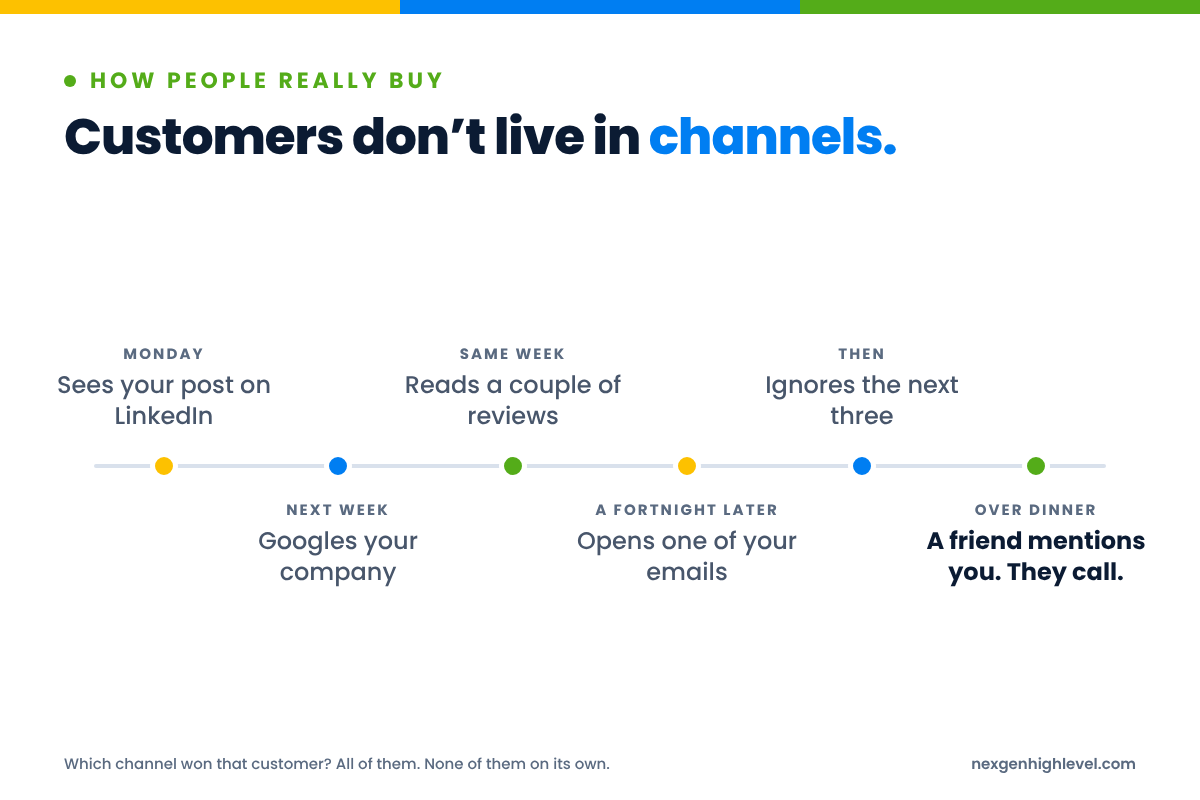
You see someone's post on LinkedIn on a Monday. You Google their company the following week. You read a couple of reviews. A fortnight later, you notice an email from them and actually open it. You ignore the next three. Then a friend mentions them over dinner, and that's when you finally pick up the phone.
Which channel won that customer?
All of them. None of them on its own.
That's how real buying works. It's messy. It's spread over weeks or months. And it doesn't care which department owns which channel.
Most of your market isn't buying today
There's another reason one channel struggles, and it's got nothing to do with the channel at all.
Professor John Dawes at the Ehrenberg-Bass Institute, in work published by LinkedIn's B2B Institute, estimated that only around 5% of B2B buyers are in market in any given quarter. The other 95% aren't.
Read that again, because it changes how you think about outreach.
Most of the people you contact this week aren't ready to buy. Not because your message was bad. Because it's not their time yet.
So what happens to them?
If your whole approach is one LinkedIn message and a follow-up, they disappear. You had the right person, at the wrong moment, and you let them go.
If you've got a second channel, they don't disappear. They stay in touch with you, quietly, until the timing changes.
And by the time they're ready, they've often decided
It gets more interesting. The 6sense 2024 B2B Buyer Experience Report found that 85% of buyers had mostly or fully defined their requirements before they engaged a seller. 81% already had a preferred vendor at first contact. And that preferred vendor won about 80% of the time.
So the real competition happens before anyone fills in a form or books a call.
Ask yourself a simple question. When one of your ideal customers finally starts looking, are you already the familiar name? Or are you the stranger who turns up at the end?
That's what combination marketing is really about. Not more touches. Being familiar before it matters.
What is combination marketing?
I call this combination marketing. The point isn't to be everywhere. It's to make the channels you use work together, around the same person and the same message.
It's not "do LinkedIn and also do email". Plenty of businesses do both and still get nowhere, because the two never meet. The LinkedIn conversation happens in one place. The email list lives somewhere else. Nobody knows that the person who just ignored their fourth email replied to a LinkedIn message yesterday.
That's not combination marketing. That's two one-channel strategies sharing an office.
When my agency built marketing systems for clinics, the results never came from one brilliant ad. They came from the ads, the website, the follow-up, the reviews, the email nurture and the booking reminders all pulling in the same direction, judged on whether the practice made more money. Not clicks. Not bookings. Revenue and profit.
Same principle here. Different channels, one goal, one person on the other end.
What LinkedIn is good at
LinkedIn is brilliant for some things.
- Finding the right people. You can see job titles, companies, industries and locations. That's gold if you know who you're looking for.
- Starting conversations. A connection request and a sensible first message can open doors that a cold email never would.
- Building credibility with your ideas. What you post tells people how you think before they ever speak to you.
- Being visible to the 95% who aren't buying yet. You turn up in their feed. They recognise the face. That counts for something.
What email is good at
Email is brilliant for others.
- Going into detail. You can explain something properly without squeezing it into a chat window.
- Sharing something useful someone can come back to. A guide, a case study, a short thought they forward to a colleague.
- Staying in touch over months without being intrusive. A useful email once a fortnight is a relationship. A LinkedIn message once a fortnight starts to feel like somebody leaning on your doorbell.
- Reaching people where they actually work. Most business owners live in their inbox far more than they live on LinkedIn.
Why they make each other better
Here's the human bit, and it's simple.
Familiarity.
When someone has seen your name and your face on LinkedIn, your email isn't from a stranger any more. They've seen your post. They've accepted your connection request. Maybe they read your profile. So when your name turns up in their inbox, there's a flicker of recognition.
That flicker matters a lot. It's the difference between "who's this?" and "oh, it's that person".
It works the other way too. Someone who's read two of your emails and found them useful is far more likely to accept your connection request and reply to your message. You're not cold any more. You're lukewarm. Maybe even warm.
I spent nearly 23 years in recruitment, most of it before email was a normal part of business. A telephone, a filing cabinet and a phone directory. The best calls I ever made were to people who'd already heard my name somewhere: a mutual contact, an event, a candidate I'd placed with a friend of theirs. Nobody needed a study to tell me that a familiar name gets a better reception than a cold one.
The tools have changed. People haven't.
People buy from people. And they buy more easily from people they recognise.
Why we added email enrichment to the LinkedIn App for HighLevel
This is where I'll talk about something we built, because it came straight out of this problem.
Our LinkedIn App for HighLevel started life as an app for one client who needed it. The LinkedIn tools out there all offered the same basic outreach, and none of them sat inside HighLevel. That was the first frustration.
The second one came quickly after. Finding the right person on LinkedIn was only half the job.
Without a reliable email address, you were stuck with one channel and one inbox. And as we've just said, LinkedIn messages are easy to miss. You could do everything right, find exactly the right person, write a thoughtful message, and still end up waiting for someone who checks LinkedIn once a month.
So we added email enrichment.
Finding the person, and a way to reach them
Email enrichment sounds technical. It isn't, really. It means that when you find the right person on LinkedIn, you can also find a verified email address for them.
Verified matters. A guessed email address that bounces does you no favours at all. It wastes the touch, and if enough of them bounce it starts to hurt your ability to land in anyone's inbox.
Once you could find the person and their verified email in one go, LinkedIn stopped being an island.
That was the game changer for us. And I don't use that phrase lightly, so let me say why. It wasn't because it gave anyone more volume. It was because it meant users could build reliable data, not just for LinkedIn, but for email too. They could find their ideal customer, enrich their email, reach them on LinkedIn and email, and nurture them over time.
For our first clients, outreach went up. So did leads, sales, revenue and profit. That's what made us ask the next question: what else can we build?
Not more volume. Joined-up conversations.
One contact, not two lists
The next part is where it all lives.
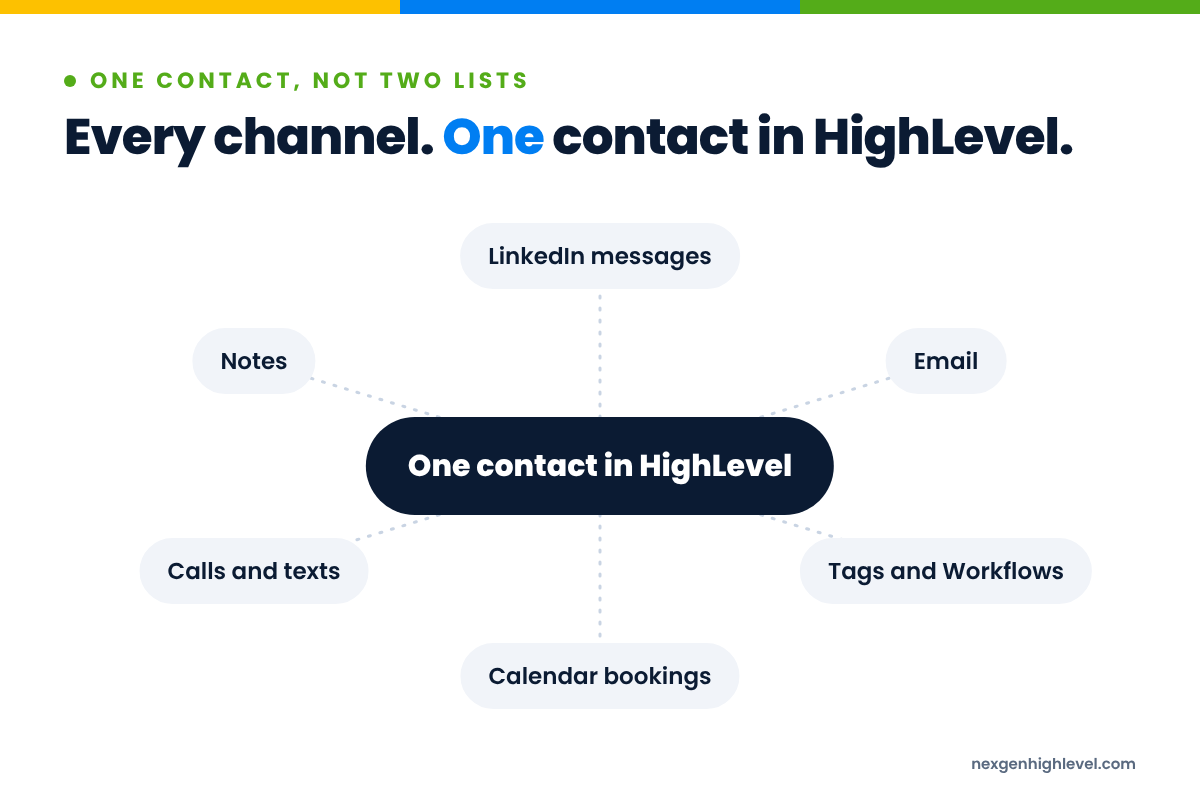
When you bring someone in from LinkedIn with the app, they go straight into HighLevel Contacts. One click. The LinkedIn profile details and the enriched email sit on the same contact record, not in a spreadsheet you'll export, tidy up and import on a Friday afternoon you'll never get back.
That sounds like admin. It's not. It's the foundation of everything else.
Because once the person is a contact in HighLevel, everything HighLevel can do applies to them. Custom fields. Smart lists. Pipelines and Opportunities. Calendars with confirmations and reminders. Email marketing. Reporting.
You're not running LinkedIn over here and HighLevel over there. LinkedIn becomes part of the system.
Tags that start the right journey
In HighLevel, tags do a lot of the heavy lifting. And with the app, a tag can be the thing that starts a Workflow.
Picture it. You find twenty practice owners in a particular region who fit your ideal customer profile. You import them and tag them for a specific campaign. That tag starts a Workflow.
The Workflow might view their profile, send a connection request a day later, and then wait. If they accept, it sends a short, personal first message. A few days after that, it sends a useful email. Not a pitch. Something they'd actually want to read.
LinkedIn actions sit right inside the Workflow builder: view a profile, like a post, send a connection request, send a message, send an InMail, withdraw a request. Right next to the email, SMS and wait steps you already know.
I'm not going to walk you through building that Workflow here. That's not the point of this article. The point is that the two channels are coordinated by one system, around one person, instead of running in parallel and hoping they don't trip over each other.
Every conversation in one place
This is the bit I like most.
LinkedIn messages sync both ways with HighLevel Conversations. So when someone replies on LinkedIn, the reply lands in the same place as their emails, texts and call notes. You can answer it from there. And it all sits on one contact.
Why does that matter so much?
Because the worst thing you can do in multichannel outreach is not know what's already happened. And when your LinkedIn inbox and your email inbox are two separate worlds, you won't know. You'll find out the embarrassing way.
We built all of this natively, on what HighLevel already has: Contacts, Tags, Workflows, Conversations. No API to wire up. No middleware. Once it's installed, it behaves like part of HighLevel, because it is part of HighLevel.
We made our app a part of HighLevel, rather than a complement to HighLevel. That's the whole idea.
If you want the bigger picture on how LinkedIn fits into finding new business in the first place, I've written about that in LinkedIn prospecting with HighLevel.
More channels, not more noise
A word of warning, because I've seen this go wrong too.
Combination marketing is not "message them on LinkedIn, then email them, then text them, then call them, all on the same afternoon". That's not a strategy. That's harassment with extra steps.
Picture being on the receiving end. You accept a connection request at 10am. By lunchtime you've had a LinkedIn message, an email asking if you saw the LinkedIn message, and a text asking if you saw the email. You're not impressed. You're blocking someone.
More channels can mean more trust. Or it can mean more noise. The difference is entirely down to how you use them.
The channels should feel like one person having one conversation, at a sensible pace.
Four questions to keep you honest
Before you add any touch to a sequence, ask yourself:
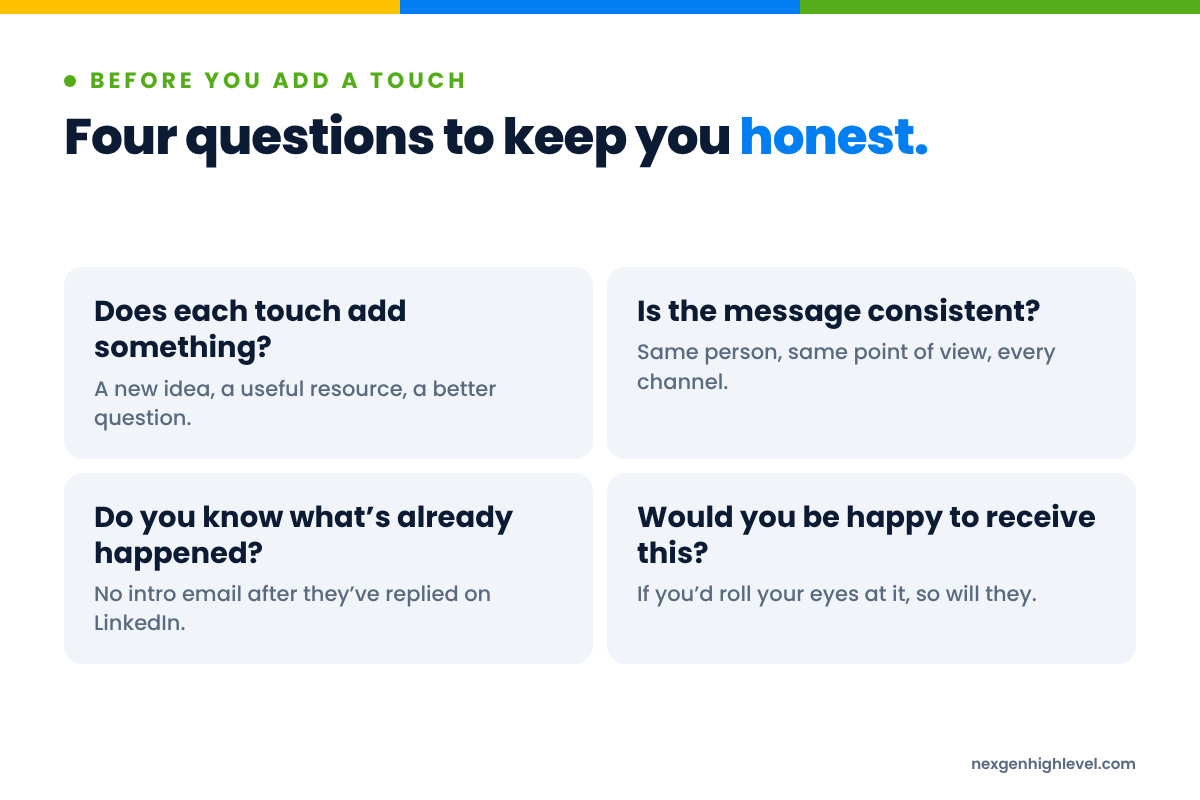
- Does each touch add something? A new idea, a useful resource, a better question. If it's just "following up on my last message", it doesn't.
- Is the message consistent? Someone who sees your LinkedIn post and your email should recognise the same person and the same point of view.
- Do you know what's already happened? Nothing kills trust faster than sending someone an introduction email after they've already replied to you on LinkedIn.
- Would you be happy to receive this? Honestly. If you'd roll your eyes at it, so will they.
That third one is why it all needs to live in one place. In HighLevel, emails, texts, calls, notes and calendar bookings all sit on the same contact, alongside the tags and LinkedIn activity that brought them in. Tag someone as replied, and your Workflows can pull them out of the email sequence straight away.
You don't have to remember, because the system does.
Respect the platform, respect the person
One more thing on noise.
LinkedIn's User Agreement (section 8.2) prohibits bots and unauthorised automated methods used to add contacts, send messages or drive inauthentic engagement. LinkedIn explains more about this in its help article on automated activity.
I'd rather you hear that from me than find out from a restricted account.
Automation should help you be organised, consistent and timely. It shouldn't be used to pretend you're a person when you're not, or to blast hundreds of people who never asked to hear from you. Sensible pace. Real messages. Real follow-up from a real human when someone replies.
If you want help with what to actually say in those messages, I've gone into that properly in writing LinkedIn outreach messages people want to reply to.
What a joined-up LinkedIn and email journey looks like
Let me sketch an example. It's illustrative, not a template, and not a story about a real client. Just a way to picture the shape of it.
Imagine you run a bookkeeping firm that works with independent dental practices. You've decided your ideal customer is a practice owner with one to three locations who's grown past the point of doing their own books.
Week one. You find a handful of practice owners on LinkedIn who fit. You bring them into HighLevel with their verified emails. A tag starts the journey. A day later, a connection request goes out with a short, plain note. No pitch.
Week two. Some accept. Those that do get a short message thanking them and asking a genuine question about how they're finding the year. Those who don't accept aren't chased on LinkedIn. They'll hear from you by email instead.
Week three. An email goes out. Something useful: "Three things dental practice owners usually find when they look at their numbers properly for the first time." No hard sell. A soft offer at the bottom for anyone who wants a chat.
Week four onwards. You post on LinkedIn about the problems these owners face. They see it in their feed. A couple of weeks later, another useful email. Then a light LinkedIn message referencing something they posted.
At any point, if someone replies on LinkedIn or by email, they come out of the automated sequence and a human takes it from there. Every reply lands on the same contact in HighLevel Conversations, so whoever picks it up can see the whole history in one place.
Notice what's not happening here. Nobody is getting four messages in a day. Nobody is being chased on a channel they've ignored. The people who aren't ready, the 95%, aren't being dropped. They're being kept warm, slowly and politely, until their timing changes.
That's the shape. One person. One conversation. Several places to have it.
When they do reply, speed matters
There's a final piece, and it's where a lot of businesses quietly lose the deal they've worked hard to start.
Someone replies. Then nothing happens for two days, because the reply was in a LinkedIn inbox nobody checked over the weekend.
The research on this is not subtle. The Lead Response Management study by Dr James Oldroyd with InsideSales found that the odds of qualifying a lead were 21 times higher when contacted within 5 minutes than after 30 minutes. And Drift's lead response research found that, of 433 B2B companies tested, only 7% responded within five minutes, and 55% hadn't responded within five business days.
Five business days. For a reply from someone who was interested.
This is another reason one place matters. When LinkedIn replies arrive in HighLevel Conversations alongside everything else, they don't get lost in a separate inbox. A Workflow can notify the right person, create a task, move the Opportunity along the pipeline and stop the outreach sequence, all at once.
What happens after the reply is a big enough subject that it gets its own article: LinkedIn lead follow-up in HighLevel.
Start small: walk before you run
Now, having said all that, please don't go away and build six channels this week.
You don't need six channels. Walk before you run.
I learned that one the hard way. I grew my recruitment business aggressively, with heavy overheads, and never imagined the world could just stop. Then Covid came along and it did. Closing that business and letting people go was the hardest decision I've ever made in business. These days my rule is simple: walk before you run. And even when you're ready to run, keep walking for a little bit longer.
It applies to outreach too.
If LinkedIn is where you're starting conversations, add one channel that works with it. Usually that's email. Get the two working together properly, with one shared view of every contact. Then add the next.
A simple order of play
If you want something practical to take away, here's how I'd think about it:
- Know who you're talking to. Be specific. A job title isn't a person. What do they actually care about this quarter?
- Get LinkedIn and email working together around one contact. Find the person, find a verified email, bring both into HighLevel.
- Write fewer, better touches. Each one adds something. Spaced sensibly. Consistent voice.
- Make replies impossible to miss. One inbox, a clear owner, fast response.
- Measure revenue, not activity. Connection requests sent and emails opened are nice. Did it make any money?
- Only then add another channel. And only if you can see it adding something.
Other channels, when you're ready
LinkedIn and email are a strong pair. They're not the only channels that can live around one contact in HighLevel.
WhatsApp is one many businesses overlook, particularly with customers who simply prefer it. Our WhatsApp app for HighLevel brings those conversations into the same place as everything else.
And for businesses that want to take cold email further, we've got a Cold Email app for HighLevel coming soon.
But I'll say it again: one channel at a time. Add each one because it solves a problem you actually have, not because it's there. Ask "What problem in my business will this solve?", not "What can this tool do?"
Technology is leverage, not strategy. Leverage multiplies whatever is underneath it. Put two channels behind a clear message and a well-chosen audience and they'll help each other. Put six channels behind a muddled message and you've found a very efficient way of annoying people in six places.
Frequently asked questions
Should I use LinkedIn or email for B2B outreach?
Both, if you can. It's not either/or. LinkedIn is good at finding the right people and starting conversations. Email is good at going into detail and staying in touch over months. On their own, each runs out of road. Together, they build familiarity, so your email isn't from a stranger and your LinkedIn message isn't from nowhere. Start with the one you're more comfortable with, then add the other.
How do I find someone's email address from LinkedIn?
Email enrichment. It means finding a verified email address for a person you've identified on LinkedIn. The word that matters there is verified: guessed addresses bounce, and too many bounces hurt your ability to reach anyone's inbox. Our LinkedIn App for HighLevel does this as part of finding and importing a contact, so the profile and the email land on the same record.
How many touches should a LinkedIn and email sequence have?
There's no magic number, and I'd be suspicious of anyone who gives you one. The better question is whether each touch adds something. A useful idea, a resource, a better question. If a step only exists to say "just following up", cut it. Space things out over weeks, not hours, and stop the sequence the moment someone replies.
Is it allowed to automate LinkedIn outreach?
LinkedIn's User Agreement (section 8.2) prohibits bots and unauthorised automated methods for adding contacts, sending messages or driving inauthentic engagement. So read it, and respect it. Use automation to stay organised, consistent and timely, not to fake being human or blast volume. Keep your pace sensible, your messages real, and make sure a person picks up every reply.
Can I manage LinkedIn messages inside HighLevel?
Yes, with the right app. Our LinkedIn App for HighLevel syncs LinkedIn messages both ways with HighLevel Conversations. Replies arrive in the same place as your emails, texts and call notes, on the same contact, and you can answer from there. That means nobody gets an introduction email after they've already replied on LinkedIn, and Workflows can react to replies straight away.
Do I need lots of channels for combination marketing to work?
No. Combination marketing isn't about being everywhere. It's about the channels you do use working together around the same person and the same message. Two channels done properly will usually beat five done badly. Walk before you run: get LinkedIn and email working together, see what happens, then decide whether a third channel would genuinely add something.
One person, one conversation
Here's what I'd like you to take away.
The clinics I worked with didn't have a Facebook Ads problem. They had a one-channel problem. Agency after agency tried to fix the channel, when the answer was to build the system around it.
LinkedIn is the same. It's a brilliant place to find people and start conversations. But it was never meant to carry the whole job on its own.
Find the right person. Find a way to reach them in more than one place. Keep it all on one contact. Say something worth hearing. Go at a pace a human would.
It's not about more channels. It's about one conversation that can happen anywhere.
Customers don't live in channels. Stop marketing like they do.