
AI on LinkedIn: Use It to Go Faster, Not to Disappear
Scroll through LinkedIn for five minutes and you'll see it.
The post that opens with a dramatic one-line hook. Then a list of seven lessons. Then "Here's the thing." Then a question at the end asking what you think. Underneath, a row of comments that all say some version of "Great insights, thanks for sharing!"
You can smell it, can't you? Nobody wrote that. Not really.
AI on LinkedIn isn't a future trend. It's already in the feed, in the comments and in your inbox. And most of it is making the people using it harder to see, not easier.
This isn't a "how to prompt ChatGPT" article. It's about something more useful to a business owner: where AI genuinely helps you grow through LinkedIn, where it quietly hurts you, and how to tell the difference before it costs you reputation, reach or your account.
How much of LinkedIn is already written by AI?
More than you'd think.
Originality.ai looked at 3,368 long-form LinkedIn posts from 99 influential profiles in 2025 and estimated that 53.7% were likely AI-generated. Over half. From people who are supposed to be the ones worth following.
The engagement picture was more interesting than the headline. Results varied by industry. In most of them, human-written posts did better. Not all of them, though, and I think that's worth being honest about. AI-written content isn't automatically a flop. It's just that, on average, people respond more to people.
Then LinkedIn itself weighed in. In June 2026 it said that content that appears AI-generated and lacks a clear perspective is less likely to be distributed widely beyond the author's immediate network.
Read that sentence again, because the important bit is easy to miss.
It's not "AI content gets punished". It's "AI-looking content with no clear perspective" doesn't travel. The problem isn't the tool. The problem is having nothing to say and getting a machine to say it nicely.
That's a thinking problem, not a technology problem. And it's one I've been banging on about for years.
Why this matters more on LinkedIn than anywhere else
Every platform has its own currency. On some it's entertainment. On some it's looks. On LinkedIn, the currency is trust.
Business owners are on LinkedIn to work out who knows what they're talking about. Who they'd hire. Who they'd recommend. Who they'd let near their customers.
The 2024 Edelman-LinkedIn B2B Thought Leadership Impact Report found that 73% of B2B buyers say thought leadership is a more trustworthy basis for judging a company's capabilities than its marketing materials.
Think about what that means. People read what you post to decide whether you're any good.
So if what you post is the same as what everyone else's AI posts, what are they judging? Your prompt?
I'm not anti-AI. Far from it.
I want to be clear about this before anyone thinks I'm the man shaking his fist at the cloud.
I use AI every day. I've built a HeyGen video version of myself, a digital twin that presents some of our content so I don't have to sit in front of a camera for every single video. Our whole business builds technology. I'm excited about where this is going.
But I'm also old enough to remember recruitment before email. A telephone, a filing cabinet and a phone directory. Every deal done face to face. No CRM, no LinkedIn, no computers on desks.
And here's what that taught me. The tools changed completely. The people didn't.
People still want to be understood. They still want to deal with someone who gets their problem. They still smell a script from a mile off, whether it's read down a phone line in 1995 or generated in two seconds in 2026.
People buy from people. I don't think that will ever change.
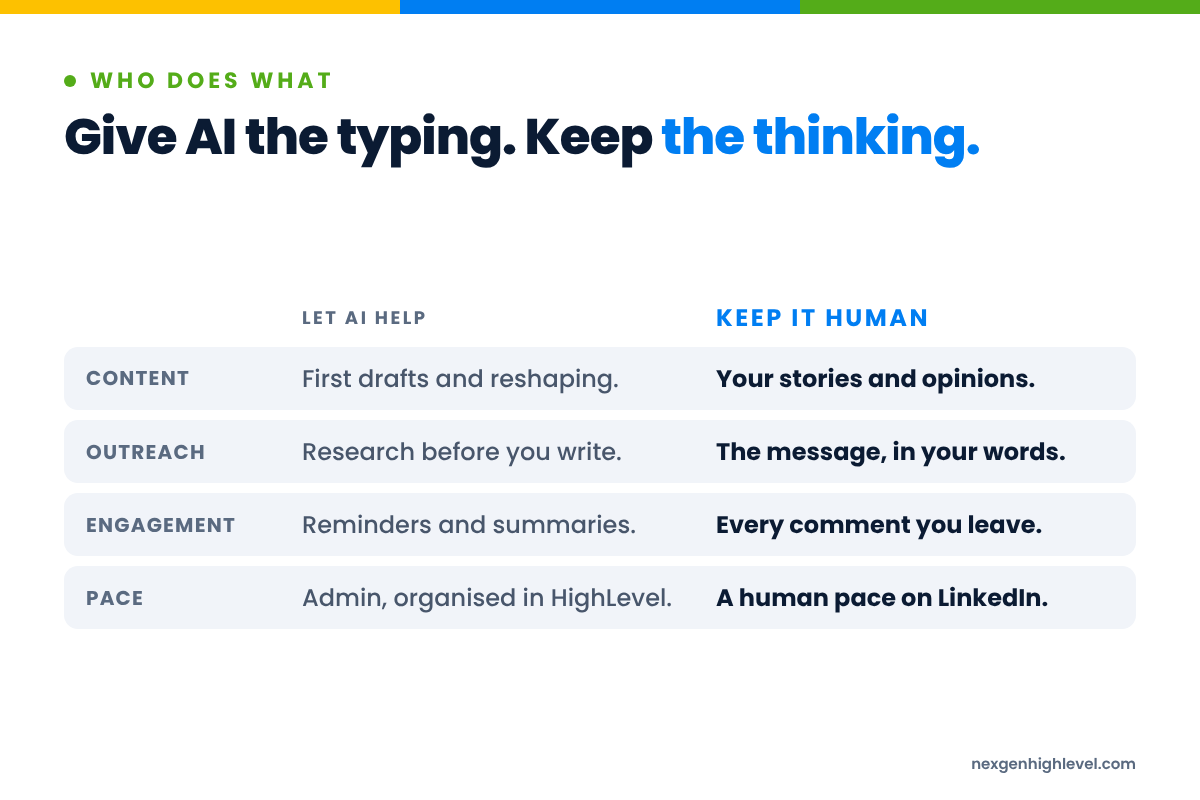
AI doesn't replace you. It speeds you up.
Here's what I believe. AI doesn't replace humans. It speeds up the process.
It does things quicker. It makes fewer mistakes on the boring bits. It lets you skip years of learning certain skills. I've watched people with no coding background build things in an afternoon that would have taken a developer weeks. It writes a first draft faster than any of us can.
But it still needs checking. Copy still needs reading by someone who knows the subject. Images and video still need great instructions. My video twin is only any good because I wrote the script, I know what I want to say, and I check what comes out the other end.
AI is only as good as the person using it.
On LinkedIn, that matters more than almost anywhere else, because the entire point of the platform is that people buy from people. If you hand the "people" part to a machine, what exactly is left for anyone to buy from?
Picture two business owners
Imagine two people running similar consultancies, both using AI on LinkedIn.
The first one types "write me a LinkedIn post about leadership" into a chat window, copies whatever comes back and hits post. Every day. Same structure, same rhythm, same "Here's the thing." Within a month, their feed reads like a fortune cookie factory.
The second one records a two-minute voice note in the car about a conversation they had with a client that morning. The client was annoyed, the reason surprised them, and they changed how they quote because of it. AI tidies that into a rough draft. They rewrite the opening, put their own phrasing back in, cut the bit that sounds too polished, and post it.
Both used AI. Both saved time.
Only one of them is still in the post.
That's the whole article, really. The rest is detail.
Don't automate mediocrity
I've got a phrase for what goes wrong. Automating mediocrity.
If your message is vague, AI will help you send a vague message to more people. If your post has no point of view, AI will help you publish pointless posts more often. If your outreach is a pitch to strangers, automation will help you annoy far more strangers than you ever could by hand.
You're now doing the wrong thing faster. That's not progress.
Technology is leverage, not strategy. And leverage multiplies whatever is underneath it. Put it behind something brilliant and it's fantastic. Put it behind something nobody wants and you've found a very efficient way of telling more people about something they don't want.
If you multiply zero by a thousand, you've still got zero.
Human. Strategy. Leverage. In that order.
This is the framework I come back to for nearly everything, and it fits AI on LinkedIn perfectly.
- Human. Who are you trying to reach? What's actually on their mind? What frustrates them, scares them, stops them acting? Not what you think they should care about.
- Strategy. What's your point of view? What do you want to be known for? What's the message, the offer, the route from "never heard of you" to "let's talk"?
- Leverage. Only now do you bring in AI and automation, to do more of what already works, faster.
Most people start at the bottom. They open the AI tool first and work backwards to the customer, if they get there at all.
Understand people first. Build the strategy second. Use technology to multiply it. Never the other way around.
The questions to ask before you let AI near your LinkedIn
Before you hand anything to AI, ask yourself:
- Do I know who this is for, by name or by type?
- Do I have an actual opinion on this topic, or am I filling a slot in a content calendar?
- Have I got a story, an example or a mistake that only I could tell?
- If this goes out and my best client reads it, will they recognise me in it?
- If it gets no likes at all, did it still say something I believe?
If you can't answer the first three, AI isn't your problem. Clarity is. And no prompt will fix that for you.
LinkedIn automation: what the rules actually say
Now the part people skip. Automation.
There's a whole market of tools that promise to run your LinkedIn for you. Send hundreds of connection requests, auto-message everyone who accepts, auto-like, auto-comment, auto-follow-up. Set it and forget it.
I'm going to be straight with you, because that's how I'd want someone to be with me.
LinkedIn's own rules are clear. Section 8.2 of the LinkedIn User Agreement prohibits using bots or other unauthorised automated methods to add contacts, send messages or drive inauthentic engagement. LinkedIn also has a help page explaining its position on automated activity.
And it applies weekly limits to connection invitations. You'll see "around 100 a week" quoted a lot, but LinkedIn doesn't publish a fixed number, and limits vary by account.
So, what does that mean for you as a business owner?
It means anything you do on LinkedIn that behaves like a bot, at bot speed and bot volume, puts your account and your reputation at risk. And for a lot of business owners, their LinkedIn account is one of the most valuable assets they've got. Years of connections. Years of conversations. Years of people seeing your name and thinking "I know them".
Would you risk that for a few hundred extra connection requests a week?
My honest advice on automation
I'm not a lawyer and this isn't legal advice. But here's what I'd do, and what I'd tell a friend.
- Read the terms yourself. Not a summary on someone's sales page. The actual User Agreement. It doesn't take long, and then you're making decisions with your eyes open.
- Keep your activity at a human pace. If no human could realistically do what your account is doing in a day, that's your warning sign.
- Automate admin, not relationships. Reminders, tagging, notes, follow-up tasks, moving a contact through a pipeline: lovely. Pretending to be you in a conversation: not lovely.
- If in doubt, do less. Fewer, better conversations beat more, worse ones. Every time.
It's not about how much you can send. It's about how much of what you send is worth receiving.
The trap of "more"
There's a reason the "more" tools are so tempting. When pipeline is thin, volume feels like action. Five hundred messages sent feels like a busy week.
But look at what B2B buyers actually do. The 6sense 2024 B2B Buyer Experience Report found that 81% of buyers already had a preferred vendor by the time they first contacted a seller, and that preferred vendor won about 80% of the time.
Read that as a business owner. Most of the decision is made before anyone sends a message. It's made while they're watching, reading, forming an impression of who seems to know their stuff.
And Professor John Dawes's work, published by LinkedIn's B2B Institute, estimates that only around 5% of B2B buyers are in market in a given quarter. The other 95% aren't buying yet.
So blasting the 100% with automated pitches mostly irritates the 95% who'll be buying later. The ones you'd actually want to remember you fondly.
Sending more is not the same as being remembered. And on LinkedIn, being remembered is the game.
Where AI genuinely earns its place on LinkedIn
Right. Enough of what not to do.
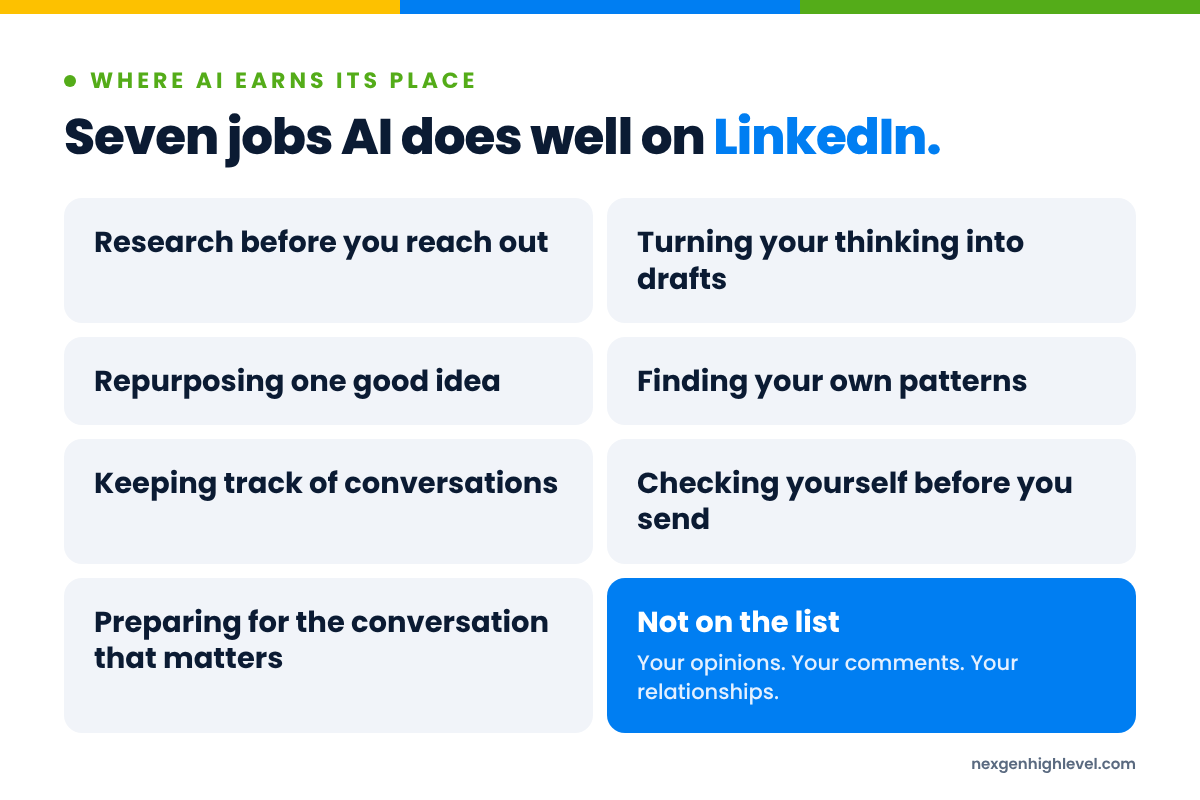
Technology should earn its place in your business. Every tool should answer one question: what problem in my business will this solve? So here's where I think AI does earn its place on LinkedIn, and how to use it without disappearing.
1. Research before you reach out
This is one of the best uses I know.
Before you message someone, ask AI to help you understand them. What does their company do? What have they been posting about? What's likely to be on their mind right now, given their industry and the time of year? What might they be worried about?
Then close the AI window and write the message yourself, with that understanding.
The research is the leverage. The message is the human part. If you want to go deeper on what that message should look like, I've written about it in how to write LinkedIn outreach messages people actually reply to.
2. Turning your thinking into drafts
Most business owners don't have a writing problem. They have a blank-page problem.
Years ago my agency worked with medical practices that simply wouldn't produce content. Put a camera in front of a doctor and they froze. The answer wasn't better content production. It was removing the blank page and the fear. We weren't really solving a content-production problem. We were solving a human-friction problem.
AI is brilliant at exactly that. Record a voice note about something that happened with a client this week. Let AI turn it into a rough draft. Then rewrite it in your words, and add the bit only you know.
The idea is yours. The experience is yours. AI just gets it out of your head and onto the page quicker.
3. Repurposing one good idea
One good idea can become a LinkedIn post, an email, a short video script, a carousel and part of a talk.
AI is very good at the reshaping, once the idea is yours. Give it your post and ask for a version that works as an email to your list. Ask it to pull out three points for a short video. Ask it what questions a sceptic would ask.
Create once, distribute well. That's not lazy. That's sensible.
4. Finding your own patterns
This one gets overlooked.
Paste in your last twenty posts and ask AI what themes keep coming up. What you seem to believe. Which topics you return to. Where you contradict yourself.
It can be a bit uncomfortable. It's also one of the quickest ways I know to find out what you're actually known for, versus what you think you're known for.
5. Keeping track of conversations
Summarising long conversations, suggesting the next follow-up, reminding you who said "come back in the spring". This is where a system like HighLevel, with Workflows doing the remembering, saves you hours without touching the human part.
When a LinkedIn conversation turns into a real lead, it belongs in your CRM, not in your head. In HighLevel that means a contact, tags, notes, an Opportunity in a pipeline and a reminder in the right place. The machine remembers. You turn up.
That's automating admin, not relationships.
6. Checking yourself before you hit send
"Does this make sense to a business owner who's never heard of me? What would they object to? What's unclear? Where am I waffling?"
AI makes a decent devil's advocate. It'll tell you your second paragraph is doing nothing, and it won't be offended when you ignore it.
It's not a replacement for a trusted colleague reading your work. But at eleven at night, when there's nobody else around, it'll do.
7. Preparing for the conversation that matters
When someone agrees to a call, AI can help you prepare. Summarise their business. List the questions you'd want to ask. Work out what objections they might have and how you'd honestly answer them.
The call itself is yours. But walking into it prepared is a gift to the other person, and they'll feel it.
Notice what's not on the list
Writing your comments. Having your opinions. Sending your relationships on autopilot.
Comments in particular. A comment is one of the most human things you can do on LinkedIn. Someone shared something, and you're responding to them. If AI writes that response, you've turned a moment of connection into a piece of admin.
People can tell. They might not say it. But they can tell.
Four tell-tale signs of AI on LinkedIn
I'm not calling anyone out. I've probably done a couple of these myself in a weak moment. But you'll recognise them.
- The comment that could be on any post. "Great insights! Thanks for sharing." It could sit under a post about tax law or a post about someone's dog dying. Which is exactly the problem.
- The message that knows your name and nothing else. "Hi [first name], I came across your profile and was impressed by your background." Impressed by what, exactly?
- The post with no fingerprints. Perfectly balanced. Every paragraph ends on a profound insight. Not a single detail you couldn't find in a thousand other posts.
- The follow-up that ignores what you said. You replied "not right now". Three days later: "Just bumping this to the top of your inbox!" No human would do that. Well, not a good one.
All four have the same root cause. Somebody let the machine do the thinking, not just the typing.
Beware the magic bullet
There's a type of person I see a lot, and I recognise bits of them in myself. I call them the Magic-Bullet Believer.
Every new tool is going to be the answer. They buy it, they never really learn to use it, and then they buy the next one. Six months later they're paying for a pile of software they barely touch, and still waiting for the one that finally works.
We've had people install one of our apps and uninstall it the next day. Go figure.
I'm not saying that to have a go at anyone. I'm saying it because it's honest. No tool, ours included, does anything until somebody understands what they're trying to achieve and sets it up properly. Not in a day. Not without some thought.
The same is true of AI. It won't fix a business that doesn't know who it's for, what it believes or why anyone should care. It'll just get you to the wrong answer quicker.
The other two who get stuck
The Magic-Bullet Believer isn't alone. There are two more personalities I see get stuck, and AI makes all three worse if you let it.
- The Tinkerer spends weeks perfecting prompts, building elaborate AI content systems and testing tools, and never actually posts anything. Lovely system. Nobody's seen it.
- The Rusher lets AI pump out thirty posts in a weekend and schedules the lot without reading them properly. Fast, yes. Also how you end up publishing something you don't believe in your own name.
I've been all three at various points. ADHD will do that. All over the place one week, hyper-focused the next.
The fix is the same for all of them. Know your goal. Plan properly. Set up properly. Understand properly. Then go for it, with AI doing the heavy lifting behind you, and you very much in front.
Your voice is the asset. Protect it.
Here's something people don't think about enough.
When you post on LinkedIn from your personal profile, you're not just sharing content. You're building a body of work that tells people how you think. Over months and years, that becomes something genuinely valuable. People feel they know you before you've ever spoken.
The Metricool and Favikon "LinkedIn in 2026" study found personal profiles had a 2.60% engagement rate versus 1.60% for company pages. That gap exists for a reason. People engage with people. I've gone into that in more detail in LinkedIn personal profile vs company page.
Now picture handing that personal profile entirely to a machine. The very thing that makes it work, you, is the thing you've taken out.
Give AI your voice, not the other way around
If you're going to use AI for drafts, and I think you should, teach it how you sound. Don't just accept how it sounds.
- Write down the phrases you actually use. The ones your team would recognise.
- Write down the things you believe that most people in your industry don't.
- Write down the stories you tell again and again, because they're true and they matter.
- Write down the words you'd never use. For me, it's guru-speak. If something's good, explain why.
Then give AI that, every time. The output will still need editing. But it'll start closer to you, and you'll spend less time scrubbing out "In today's fast-paced business landscape".
It's not about making AI sound human. It's about making sure it sounds like this particular human.
Where HighLevel fits
I'll keep this short, because this article isn't a sales pitch.
If you're running your business on HighLevel (some people still call it GoHighLevel), it's worth thinking about it as the place where the admin side of LinkedIn lives. Not the conversation itself. Everything around it.
- Contacts and custom fields to record who someone is and what they care about.
- Tags and smart lists to group people properly.
- Workflows to create the reminders and follow-up tasks, so nobody falls through the cracks.
- Conversations to keep your messages in one inbox.
- Opportunities and pipelines so you can see what's actually moving.
- Reporting so you know whether any of this is paying off.
That's the right job for automation. The boring, important, easy-to-forget bits. You stay in the conversation; the system makes sure the conversation doesn't get lost.
We build apps that sit natively inside HighLevel for exactly this reason, and you can see the full range of NexGenHighLevel apps if you're curious. But nothing on that page replaces the thinking. It just gives the thinking somewhere to live.
And when you want to know whether your LinkedIn effort is actually turning into revenue, not just likes, I've written about that in how to measure LinkedIn ROI. Does it make any money? That's always the question.
The test: Could anyone else have written this?
Before you post, comment or send anything on LinkedIn that AI helped you write, ask one question.
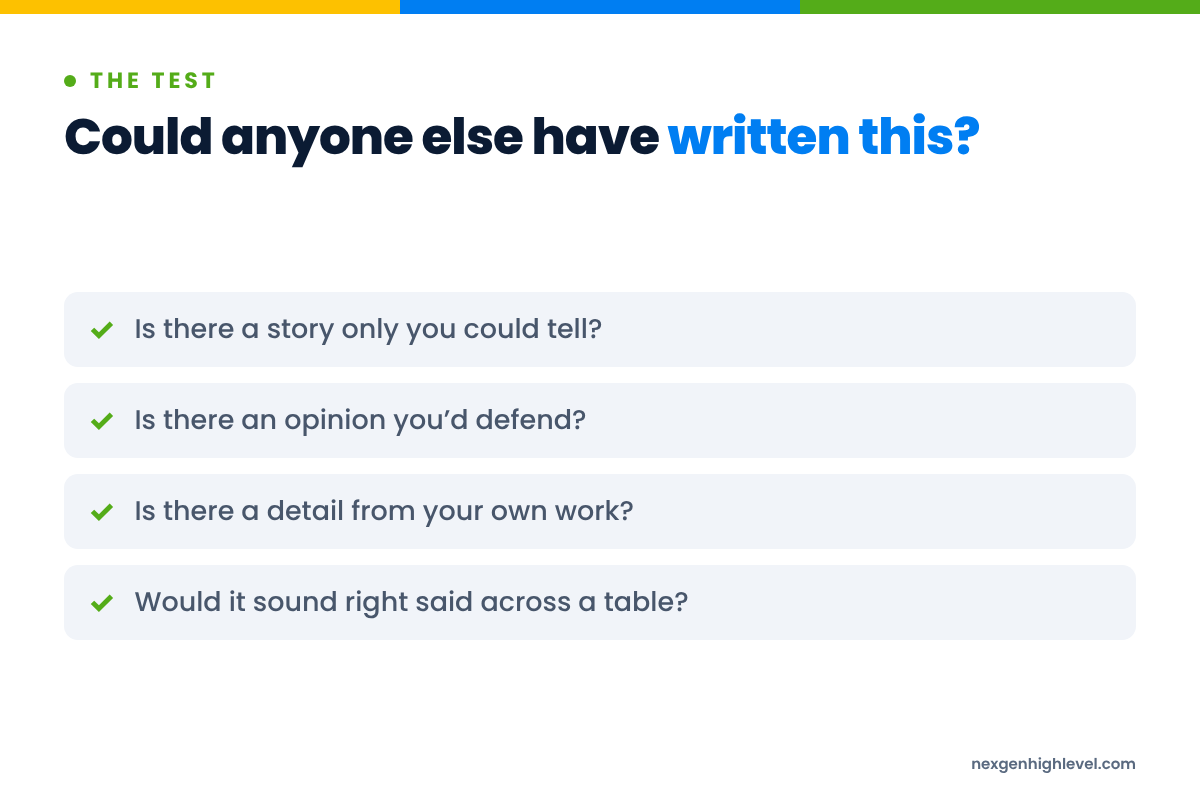
Could anyone else have written this?
If the answer is yes, it doesn't belong to you yet. Add the story, the opinion, the detail, the mistake you made. Add the part that's yours.
A few quick ways to put yourself back in:
- Add a specific. Not "a client". Something like "a client last Tuesday who'd been through four agencies this year" (an example, by the way; use your own).
- Add an opinion. Something you'd be happy to defend across a table.
- Add a mistake. Something you got wrong and what it taught you. Nothing builds trust quicker.
- Cut the throat-clearing. If the first two lines could open any post, delete them.
- Read it out loud. If you wouldn't say it like that over a pint, don't post it like that.
It takes five minutes. It's the difference between a post that's yours and a post that's anyone's.
Frequently asked questions
Is it OK to use AI to write LinkedIn posts?
Yes, with one condition: the thinking has to be yours. Use AI to get your ideas onto the page faster, to tidy a draft, or to reshape one idea for different formats. Then edit it until it sounds like you and contains something only you could say. LinkedIn has said content that appears AI-generated and lacks a clear perspective is less likely to travel widely. Perspective is the bit you bring.
Does LinkedIn penalise AI-generated content?
LinkedIn said in June 2026 that content which appears AI-generated and lacks a clear perspective is less likely to be distributed widely beyond your immediate network. That's not the same as banning AI. The way I read it, the issue is generic content with nothing to say, however it was produced. Use AI as a helper, keep your point of view front and centre, and you're working with the platform, not against it.
Are LinkedIn automation tools allowed?
Section 8.2 of the LinkedIn User Agreement prohibits bots and other unauthorised automated methods used to add contacts, send messages or drive inauthentic engagement. LinkedIn also applies weekly limits on connection invitations. I'm not a lawyer, so read the terms yourself. My own rule is simple: keep activity at a human pace, automate the admin around your conversations, and never automate the relationships themselves.
What should I never automate on LinkedIn?
Your comments, your opinions and your actual conversations. A comment is a small human moment; a machine-written one turns it into admin and people can usually tell. The same goes for replies to someone who's taken the time to message you. Automate reminders, notes, tagging and follow-up tasks in a CRM like HighLevel. Keep the bits where a person talks to a person for yourself.
How can AI help with LinkedIn outreach without sounding robotic?
Use AI for the research, not the relationship. Ask it to summarise what a company does, what they've been talking about and what might be on their mind. Then write the message yourself, referencing something real. Keep it short, make it about them, and don't pitch in the first message. AI helps you understand the person faster; you still have to be the one who turns up.
Can AI replace a LinkedIn strategy?
No. AI can multiply a strategy, but it can't give you one. If you don't know who you're for, what you believe and why anyone should care, AI just helps you say nothing more often. Start with the human, build the strategy, then bring in AI and automation as leverage. Human. Strategy. Leverage. In that order.
Use AI. Stay in the picture.
AI on LinkedIn is here to stay, and I'm glad about it. It's saved me hours. It's let me do things I'd never have had the time or the skills to do. I've literally got a video version of myself.
But every one of those things works because there's a real person behind it, deciding what's worth saying.
That's the job AI can't do for you. Knowing your customer. Having a point of view. Turning up as yourself, consistently, for long enough that people start to trust you.
The tools will keep changing. People won't.
Use AI to go faster. Don't use it to disappear.